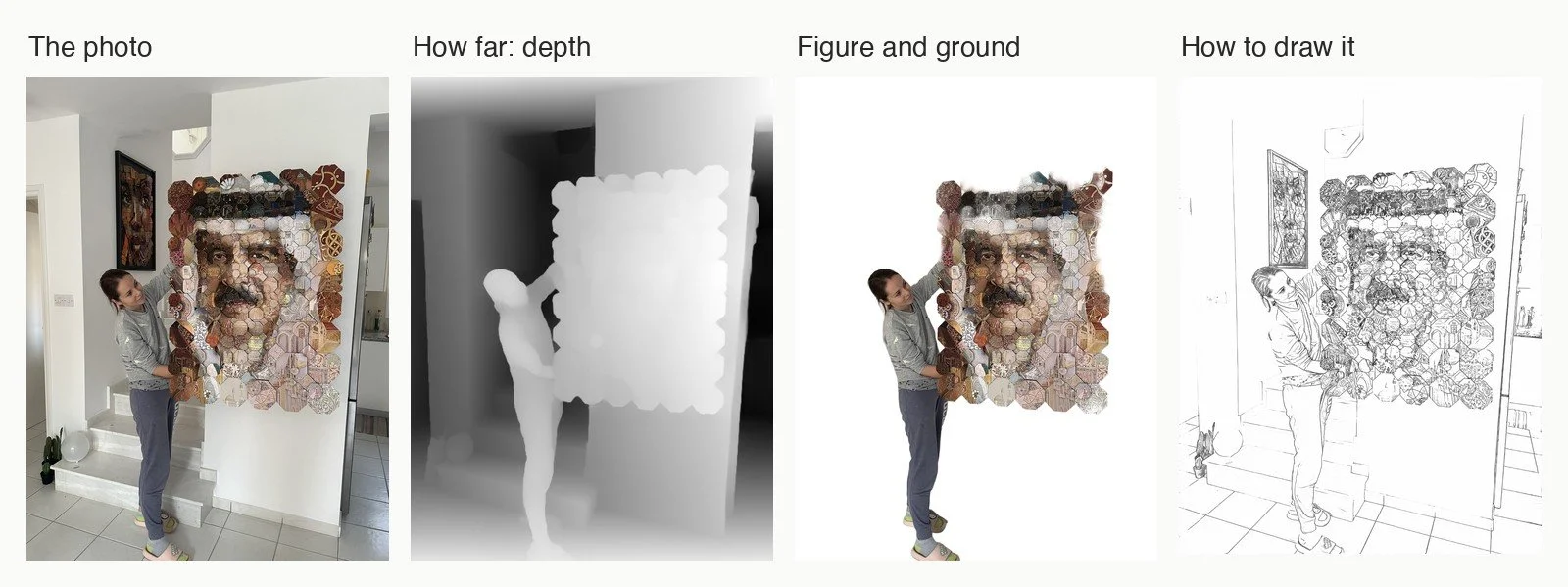
A machine can now look at a flat photograph and tell how far away each point is, which way every surface faces, where the figure ends and the ground begins, and how an illustrator might draw it. It can find, among thousands of pictures, the ones that are about the same thing, read the titles on a shelf of books, and count the brushes on a work table. All of it in this article ran on one desktop computer, offline, almost all of it with open tools. This article is about what these tools can do for anyone who works with images, how they work, and where they fail.
I see the world through two different eyes. One is strongly short-sighted, the other not at all. The name for this is anisometropia. I learnt early that my sight needs support.
I also believe that humans are a weak animal, and that it is technology that gives us our advantage over the rest of nature. Machines that see are the newest part of that story, and for anyone who works with images they are the most interesting part.
There is a third reason: I find machine learning fascinating, because it is a kind of education. As a teacher you learn early that you do not only teach: your students teach you back. Training a model to see is the same exchange. To understand what a model has learnt, you have to ask what seeing actually is, and the answers say as much about us as about the machine.
And then there is the practical side, which is remarkable. Machines see much as we do, and they also see things we cannot tell apart: the exact depth of every point in a flat photo, the direction each bit of a surface faces, the one picture among thousands that is about the same thing as another.
The article is written for designers, illustrators, photographers, art directors and artists. Each section starts from something you may need to do with an image, explains in plain terms how the method behind it works, and shows what it did on my own pictures and works, where it failed, and what I made with it. Every section ends with a short list for further reading.
Only a small part of a large field
Computer vision is a large field, and what follows is a small, personal selection: the methods I use, or have tried, in image work. A great deal is left out. Image classification, pose estimation, optical flow and tracking in video, stereo vision and photogrammetry, image generation, medical and satellite imaging, visual question answering and much more are whole fields of their own. If one of them is closer to your work, the further reading in each section is a good way into the literature, which is deep and mostly open.
Before learning
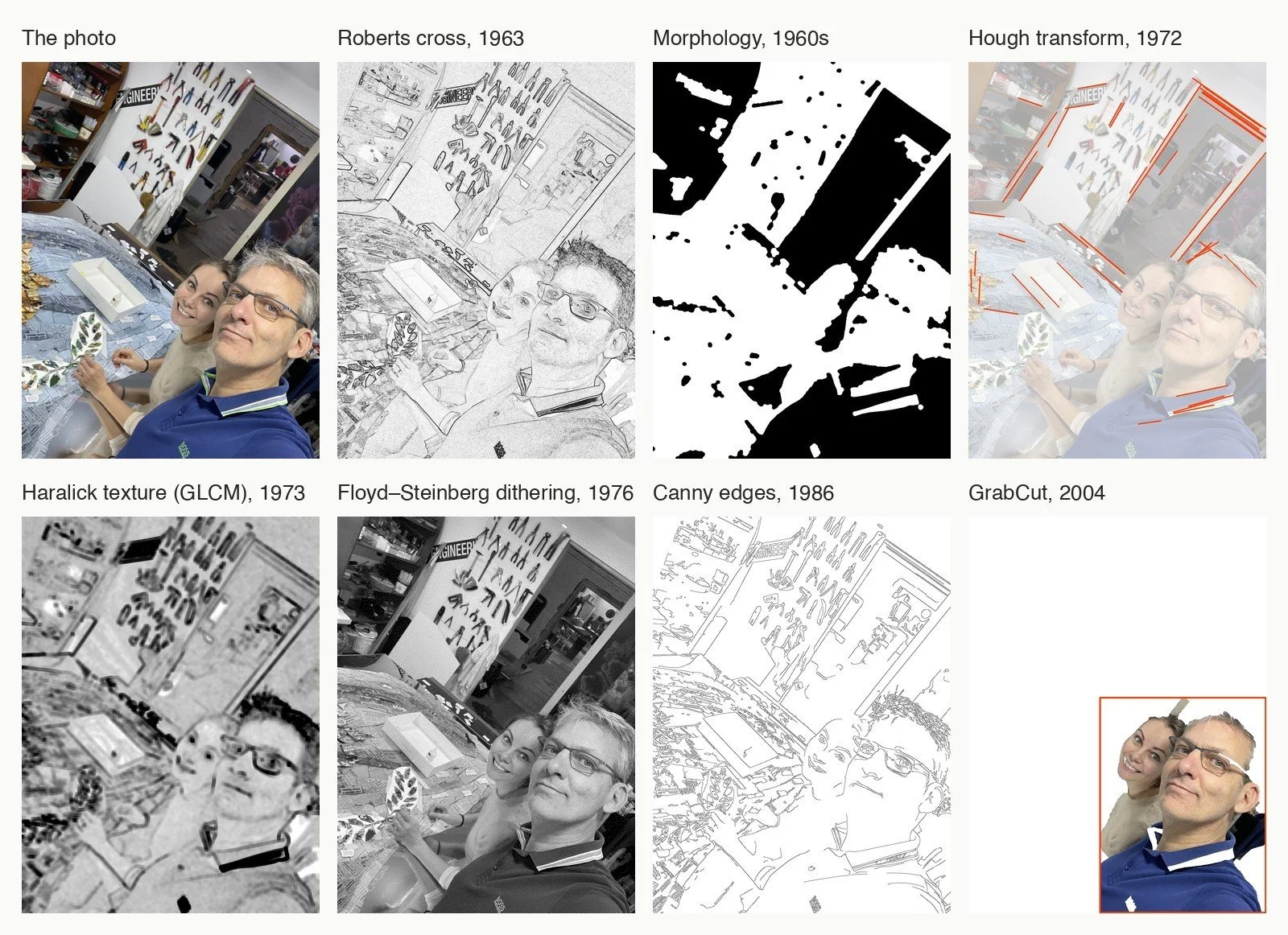
Computer vision did not begin with neural networks. For about fifty years, people wrote the rules of seeing by hand. Someone decided what an edge is, what a texture is, how to tell a figure from its ground, and wrote it down as arithmetic a computer could run on every pixel. I still use these methods all the time, and they are where my own interest began.
Roberts cross (1963). In his doctoral thesis at MIT, Lawrence Roberts tried to make a computer understand a photograph of simple blocks. One step on the way was to find edges, and the operator credited to this work, now called the Roberts cross, compares each pixel with its diagonal neighbours: where the difference is large, there is an edge. Two tiny grids of numbers, two by two: one of the first edge detectors, and still one of the simplest.
Mathematical morphology (mid-1960s). Georges Matheron and Jean Serra, at the École des Mines de Paris, started from mining: how to measure the shape of grains and pores in sections of rock and ore. Their answer was to treat an image as a set of shapes and to probe it with another small shape, the structuring element. Erosion shrinks every shape by that probe, dilation grows it, and combined they remove noise, close gaps and separate touching objects. In the figure, a threshold and two such operations turn the studio into a few clean shapes.
The Hough transform (1962, 1972). Paul Hough patented, in 1962, a way to find straight tracks in bubble-chamber photographs. Ten years later Richard Duda and Peter Hart gave it the form used today: every edge pixel votes for all the lines that could pass through it, and the lines with the most votes win. It finds the door frame, the shelf and the edges of the table, and leaves the faces alone, which have no straight lines.
Haralick texture (1973). Robert Haralick and his colleagues asked how to describe a texture with numbers. They counted how often each grey value sits next to each other grey value, in a table called the grey-level co-occurrence matrix, or GLCM, and read measures such as contrast from it. In the figure, dark means rough: the tools on the wall, the hair and the pieces on the table, against the smooth wall.
Dithering (1976). How do you show grey with only black and white? Printers have answered with dots since the first photomechanical halftones of the early 1880s. For screens and digital printers, Robert Floyd and Louis Steinberg’s error diffusion (1976) does it pixel by pixel: round each pixel to black or white, and pass the error you made on to the neighbours not yet visited. The picture in the figure has no grey at all.
Canny edges (1986). John Canny set out what a good edge detector should do: find real edges, place them exactly, and mark each one only once. From those three demands he derived a method that smooths the image, measures the gradient, thins it to one-pixel lines and keeps weak edges only if they connect to strong ones. Forty years on, it is still the first thing I try.
GrabCut (2004). Carsten Rother, Vladimir Kolmogorov and Andrew Blake, at Microsoft Research in Cambridge, made cutting out a figure nearly effortless: you draw a rectangle around it, and the method models the colours inside and outside, then finds the cheapest border between them with a graph cut. It is not a neural network, and it shows: it kept both faces, but cut a gap through the man’s glasses and kept a scrap of the background above them.
What all of these have in common is that a person decided what to look for. That is their strength. They are fast, they give the same answer every time, and when they fail you can say why. It is also their limit: no one can write down, by hand, what a face looks like, or what makes two pictures about the same thing.
The turn (2012). In 2012 a network trained by Alex Krizhevsky, Ilya Sutskever and Geoffrey Hinton, now known as AlexNet, won the ImageNet challenge by a margin that surprised the field: its top-5 error was 15.3%, against 26.2% for the next entry. It had not been told what an edge or a texture is. It had been shown more than a million labelled photographs, and it learnt for itself which features to look for. In its first layer it found edge and colour detectors much like the ones above. Nearly everything in the rest of this article comes after that moment.
On my computer the first six methods took between 3 milliseconds and 2 seconds on this photo; GrabCut took 11 seconds.
Further reading
- Lawrence G. Roberts, Machine Perception of Three-Dimensional Solids, PhD thesis, MIT, 1963.
- Seymour Papert, The Summer Vision Project, MIT AI Memo 100, 1966. A plan to build a large part of a visual system in one summer.
- Jean Serra, Image Analysis and Mathematical Morphology, Academic Press, 1982; and Georges Matheron at the École des Mines.
- Richard O. Duda and Peter E. Hart, Use of the Hough Transformation to Detect Lines and Curves in Pictures, Communications of the ACM, 1972; and Hough’s patent, US 3,069,654.
- Robert M. Haralick, K. Shanmugam and Its’hak Dinstein, Textural Features for Image Classification, IEEE Transactions on Systems, Man, and Cybernetics, 1973.
- Robert W. Floyd and Louis Steinberg, “An Adaptive Algorithm for Spatial Grey Scale”, Proceedings of the SID, 1976.
- John Canny, A Computational Approach to Edge Detection, IEEE TPAMI, 1986.
- Carsten Rother, Vladimir Kolmogorov and Andrew Blake, GrabCut: Interactive Foreground Extraction using Iterated Graph Cuts, ACM Transactions on Graphics (SIGGRAPH), 2004.
- Alex Krizhevsky, Ilya Sutskever and Geoffrey E. Hinton, ImageNet Classification with Deep Convolutional Neural Networks, NeurIPS 2012.
Understand the form before you touch the picture
A flat picture hides its own shape. Before you decide how to break a picture into parts, how to light it again, or how to turn it into something else, it helps to know what is near and what is far, which way each surface faces, and what the object might look like from the other side. Three kinds of model answer these questions.
How far is each point? Depth from one photo
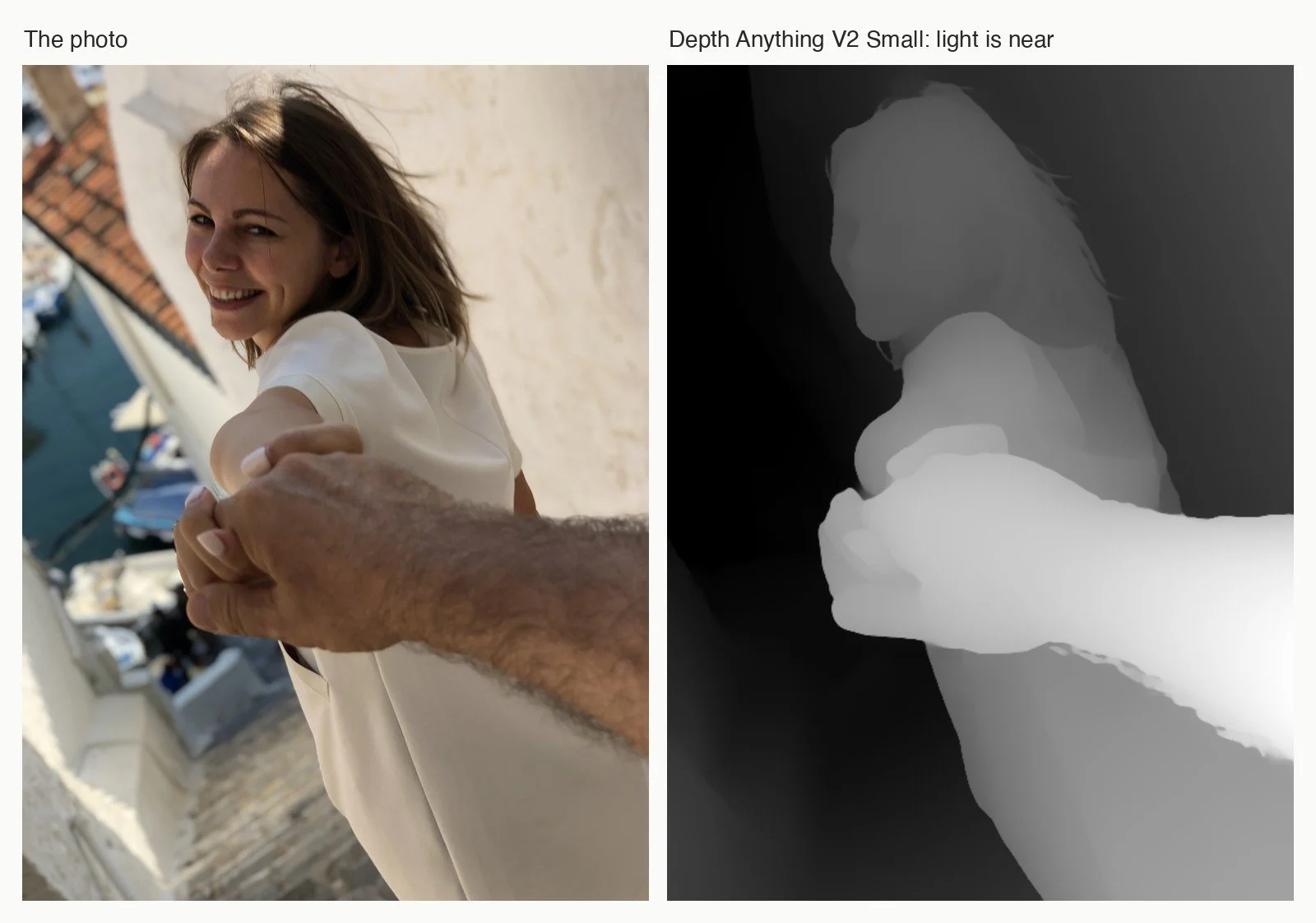
What it gives you. From a single ordinary photograph, a grey image in which light means near and dark means far. In the photo above, the hand reaching for the camera is bright white, the woman is a lighter grey than the wall behind her, and the harbour below falls into black.
How it works. One photograph has no depth in it. We infer depth anyway, from size, overlap, perspective and from what we know about the world, and a depth model learns to do the same. Depth Anything V2 (2024) reads the photo with a large encoder trained by Meta without any labels (DINOv2), and a decoder turns what the encoder sees into a depth map. The clever part is how it was taught. A large teacher model first learnt from synthetic images, where the depth of every pixel is known exactly; it then labelled millions of real photographs, and the smaller models learnt from those. What comes out is relative depth: which things are nearer, not how many metres away.
What you can do with it. Separate a figure from the room around it without drawing a mask, make a short parallax film out of one still, and above all guide structure. I use it for that most of all. In a mosaic, or in any picture built from parts, the direction of the parts matters. If the guides come from colour edges, every floor tile and window glare becomes a guide and the picture breaks into crazy paving. If they come from depth, the parts wrap the desk, the chair and the body as objects.
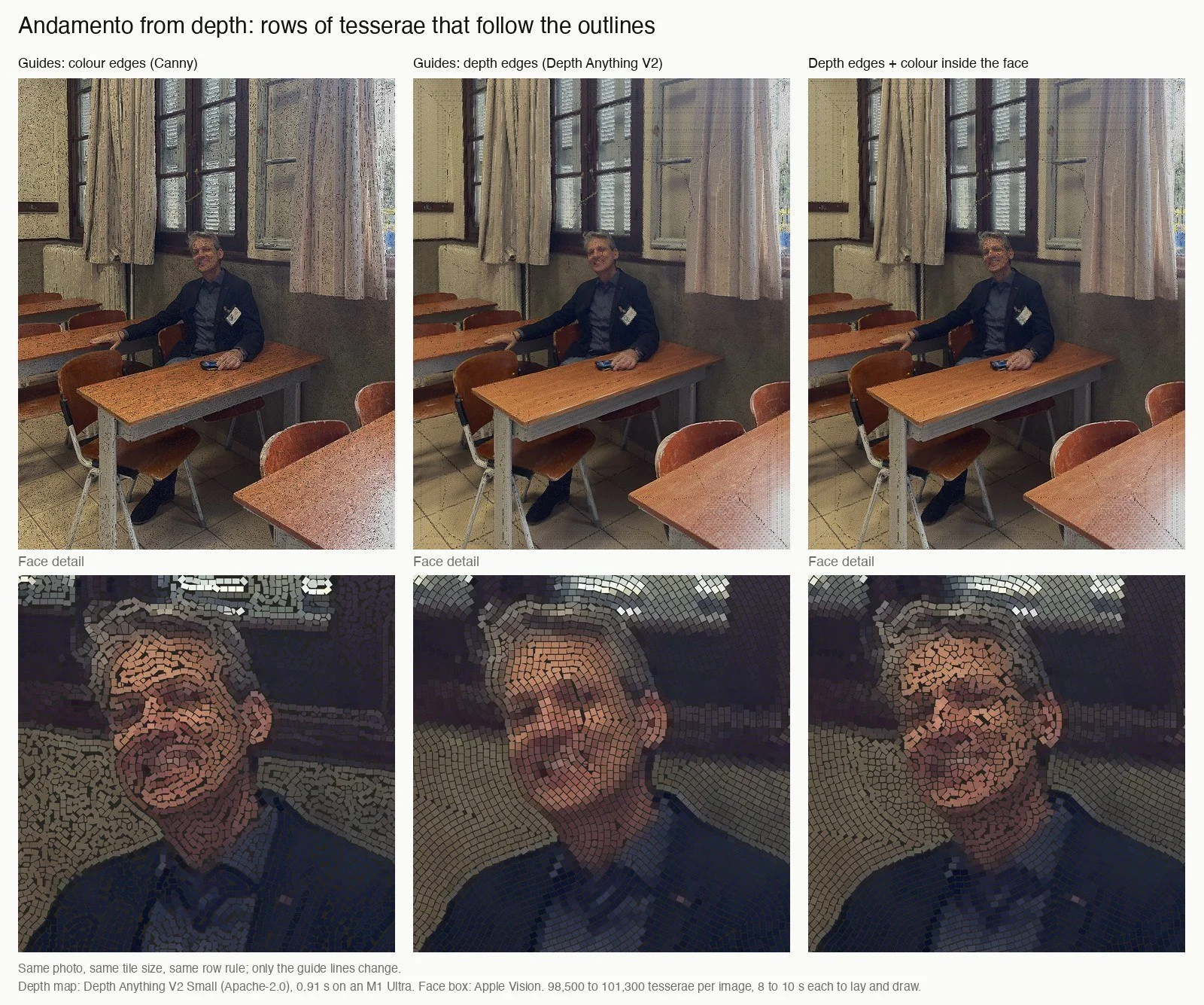
Where it fails. Inside a face there is almost no depth, so eyes and mouth vanish from the map. In the version on the right I used depth for the room and colour edges only inside the face. Thin things and glass are hard for every model of this kind.
Depth Anything V2 Small, on my computer: about half a second per picture, and under a second to load the model.
Further reading
- Yang et al., Depth Anything V2, NeurIPS 2024, and the first version, Depth Anything, CVPR 2024.
- Oquab et al., DINOv2: Learning Robust Visual Features without Supervision, 2023.
- Code: Depth-Anything-V2. The Small model is Apache-2.0; the Large one is non-commercial (CC BY-NC 4.0).
Which way does each surface face? Normals and new light
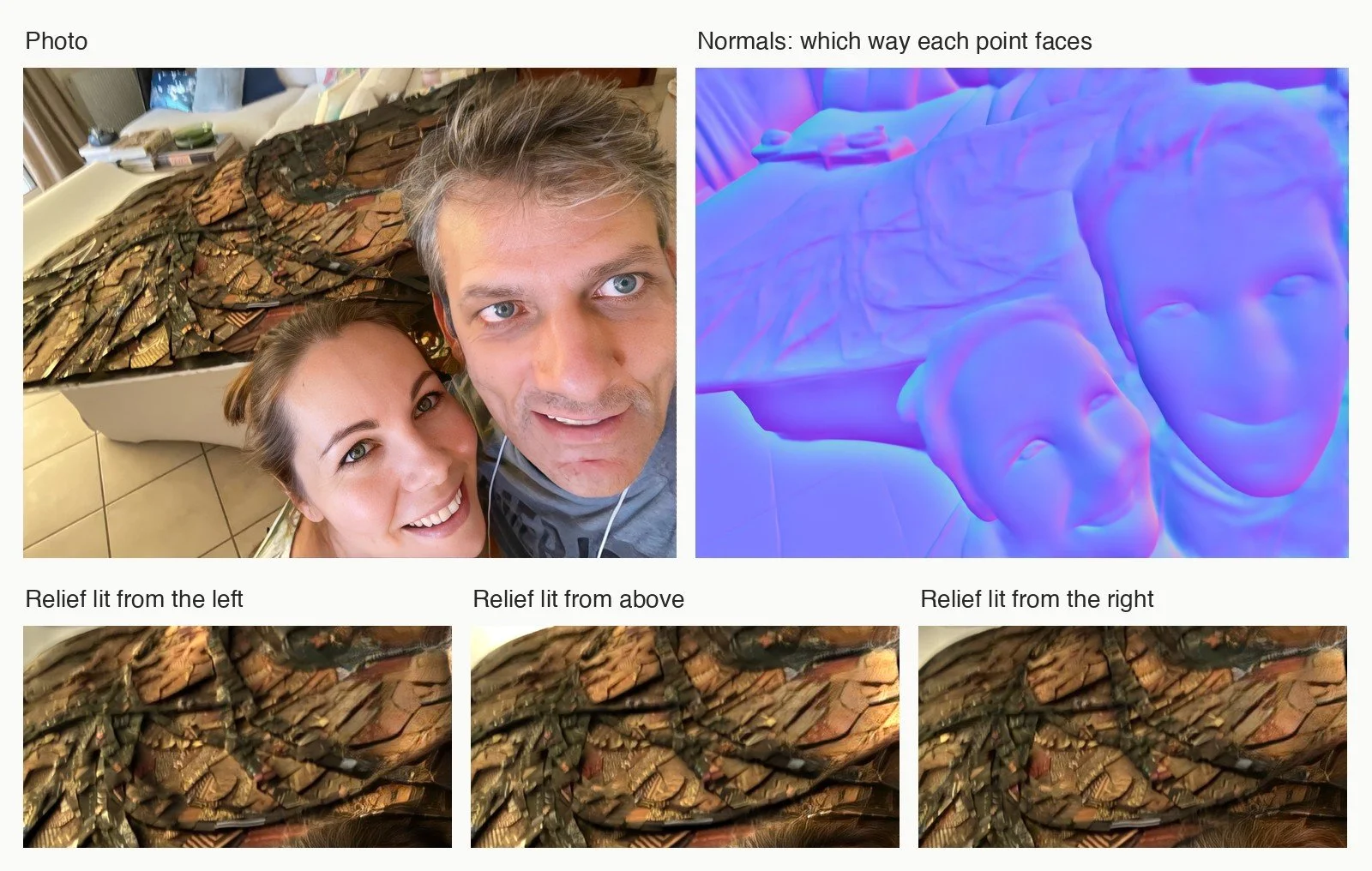
What it gives you. For every pixel, the direction the surface faces. Stored as red, green and blue, this is a normal map, the lavender image you may know from 3D games. With it, you can light a photographed surface again from any side.
How it works. A normal is an arrow standing straight out of a surface. Metric3D v2 (2024) predicts depth and normals together, each helping the other. A single photo cannot tell a small near object from a large far one, and Metric3D’s answer is to bring every training image to one imagined canonical camera, so the model learns scale consistently across photographs from thousands of different cameras. Once you have the normals, light is plain arithmetic, the same rule painters learn by eye: a surface is as bright as it faces the lamp (Lambert’s cosine law).
What you can do with it. See the relief in a painted or collaged surface, and test light before you photograph it. I use it on my own canvases. In the photo above, two faces lean in front of a relief of layered pieces. The model gives the faces their full shape, brows, nose and chin, and the relief only shallow ridges, because it is shallow. Lit again from the left, from above and from the right, the ridges catch the light; on a relief this shallow, I had to exaggerate the light to make it visible.
Where it fails. Shape is not light. I tried to light a dark paper relief through a whole day, from dawn to dusk, and it did not work: the normals were right, but a dark piece barely changes under a new light, and one exposure for the whole day burned noon to white and turned dawn black. A model that measures shape well is not a renderer. The photograph already holds the light of the moment it was taken.
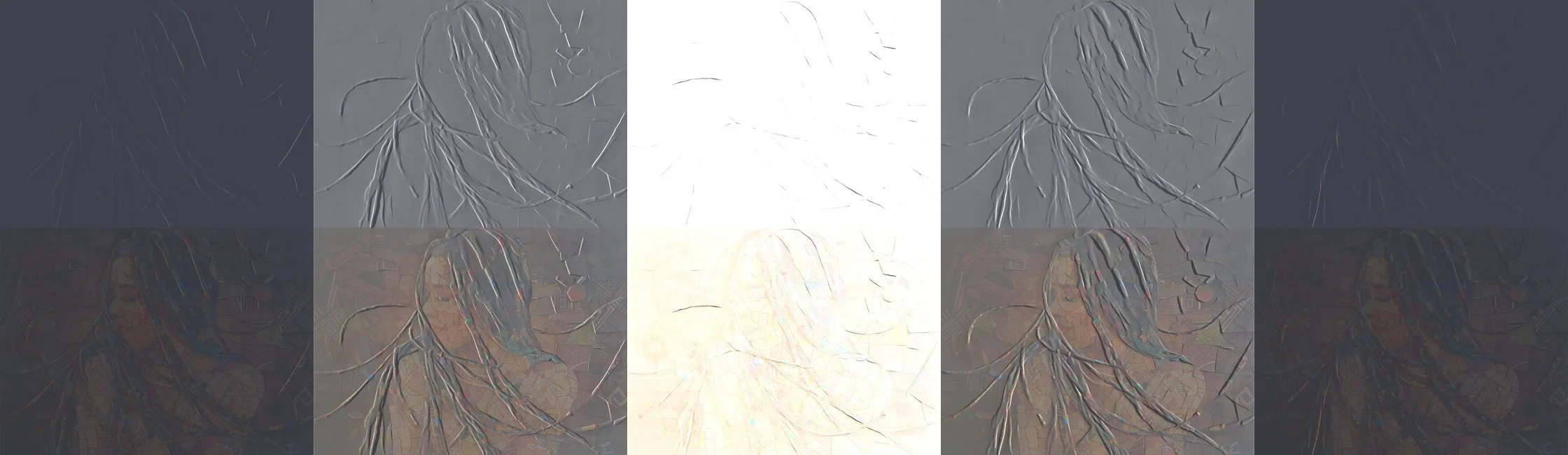
Metric3D v2, on my computer's processor: 24 seconds for this photo.
Further reading
- Hu et al., Metric3D v2, IEEE TPAMI 2024, and Yin et al., Metric3D, ICCV 2023. Code: YvanYin/Metric3D, BSD-2-Clause.
- Frankot and Chellappa, A method for enforcing integrability in shape from shading algorithms, IEEE TPAMI 1988. How to turn normals back into a height map.
- Bae and Davison, Rethinking Inductive Biases for Surface Normal Estimation (DSINE), CVPR 2024. Very good, but for non-commercial research only.
What is on the other side? One photo to 3D
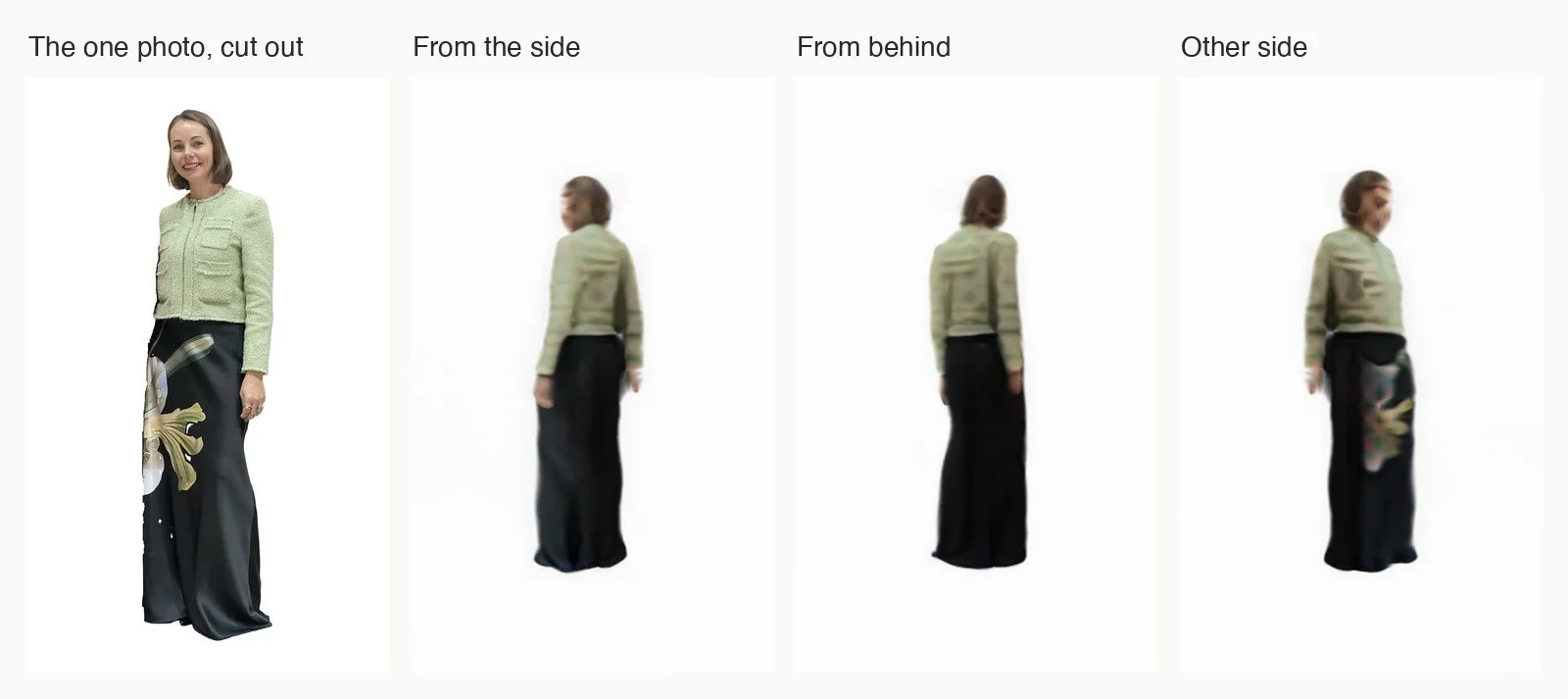
What it gives you. From one photograph of a person or an object, a 3D model you can turn around.
How it works. TripoSR (2024, by VAST and Stability AI) reads the photo with an image encoder and turns what it sees into a triplane: three flat maps of features facing three directions. From these, a small network can say what colour and how solid any point in space is, and a mesh is cut out of that space. It does all this in one pass, without slow fitting for each object, which is why it is fast. It has never seen the back of your subject. It guesses it.
What you can do with it. Use it as a sketch, not as a result: turn a figure to see how it might sit in space, or find a viewpoint the photo does not have.
Where it fails. From one photo of a woman standing, the jacket, the long skirt and the pose hold from every side. The rest is guessed: the face is a blur as soon as the figure turns, the back of the skirt comes out plain black, and the lily printed on its front reappears on the far side. Everything the camera never saw is invented. It also needs a clean subject: an earlier try, on a woman holding a large board in front of her, came out as a board with legs.
TripoSR, on my computer: under two minutes from the cut-out to these four views, most of it rendering.
Further reading
- Tochilkin et al., TripoSR: Fast 3D Object Reconstruction from a Single Image, 2024. Code: VAST-AI-Research/TripoSR, MIT.
- Hong et al., LRM: Large Reconstruction Model for Single Image to 3D, 2023. The design TripoSR builds on.
- Xiang et al., Structured 3D Latents for Scalable and Versatile 3D Generation (TRELLIS), 2024. Better results, but it asks for a large NVIDIA graphics card.
Find anything in an archive
An archive of thousands of pictures is only as useful as your ways into it. File names are rarely helpful, tags are never complete, and nobody wants to tag ten thousand images by hand. Four kinds of model let you search pictures by what is in them.
Search by meaning
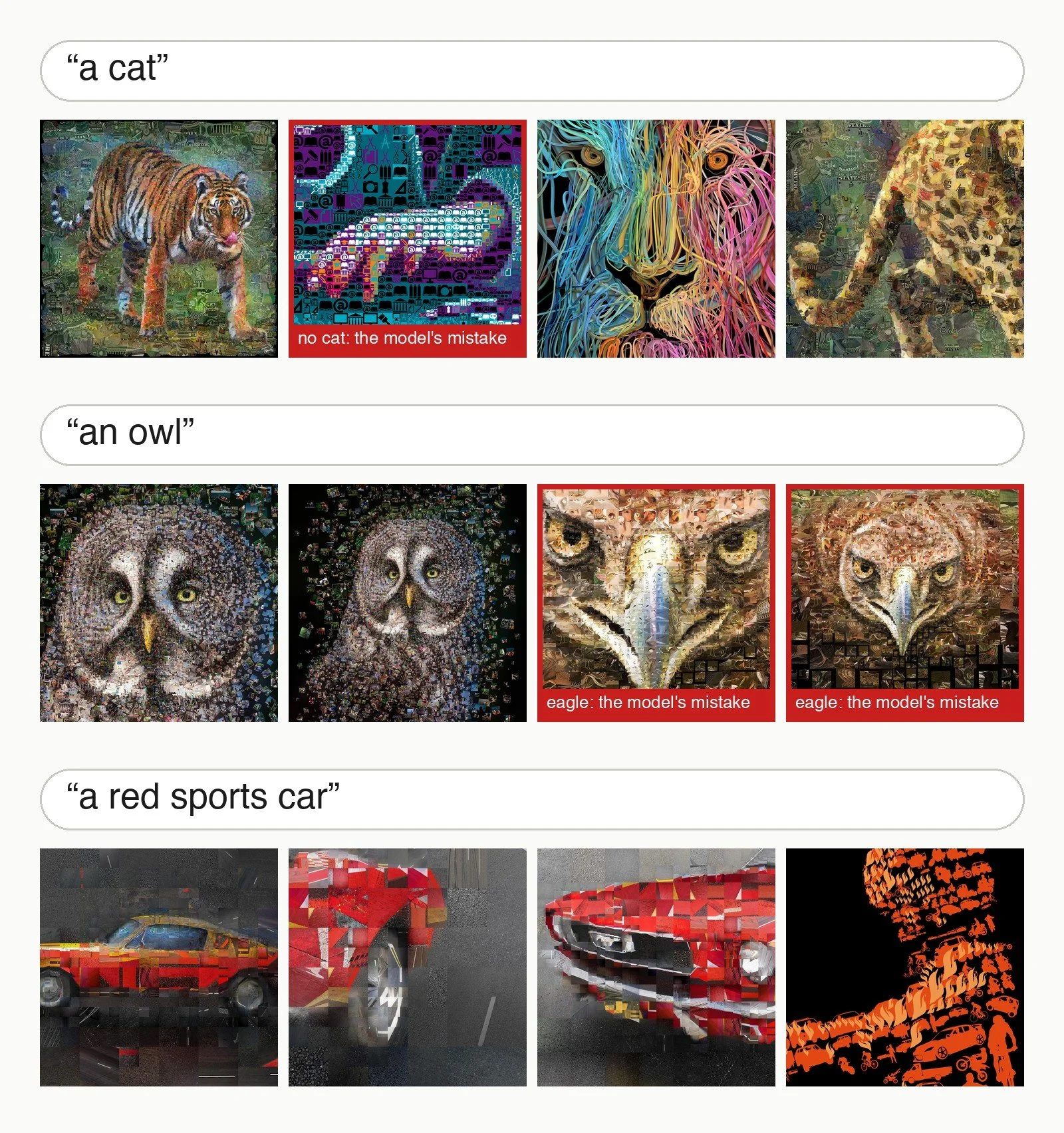
What it gives you. You type “an owl” and get the pictures of owls in your archive, though no picture was ever tagged “owl”. Or you give it a picture and get the ones that are about the same thing.
How it works. CLIP, released by OpenAI in 2021, is two networks trained together: one reads images, one reads text. Each turns its input into a list of numbers, an embedding. During training it saw 400 million images with their captions from the web, and learnt to place each image close to its own caption and far from all the others. After training, the picture of an owl and the words “an owl” land near each other in the same space, so a search is only a comparison of directions. It never learnt a fixed list of categories, which is why you can ask it about anything.
What you can do with it. Search an archive that has no tags. Find every picture that looks like one you already have. Or lay out a whole archive by subject. I gave it every image of my portfolio, with no names, tags or colours, only the pixels, and placed the pictures on a grid by what CLIP saw in them.
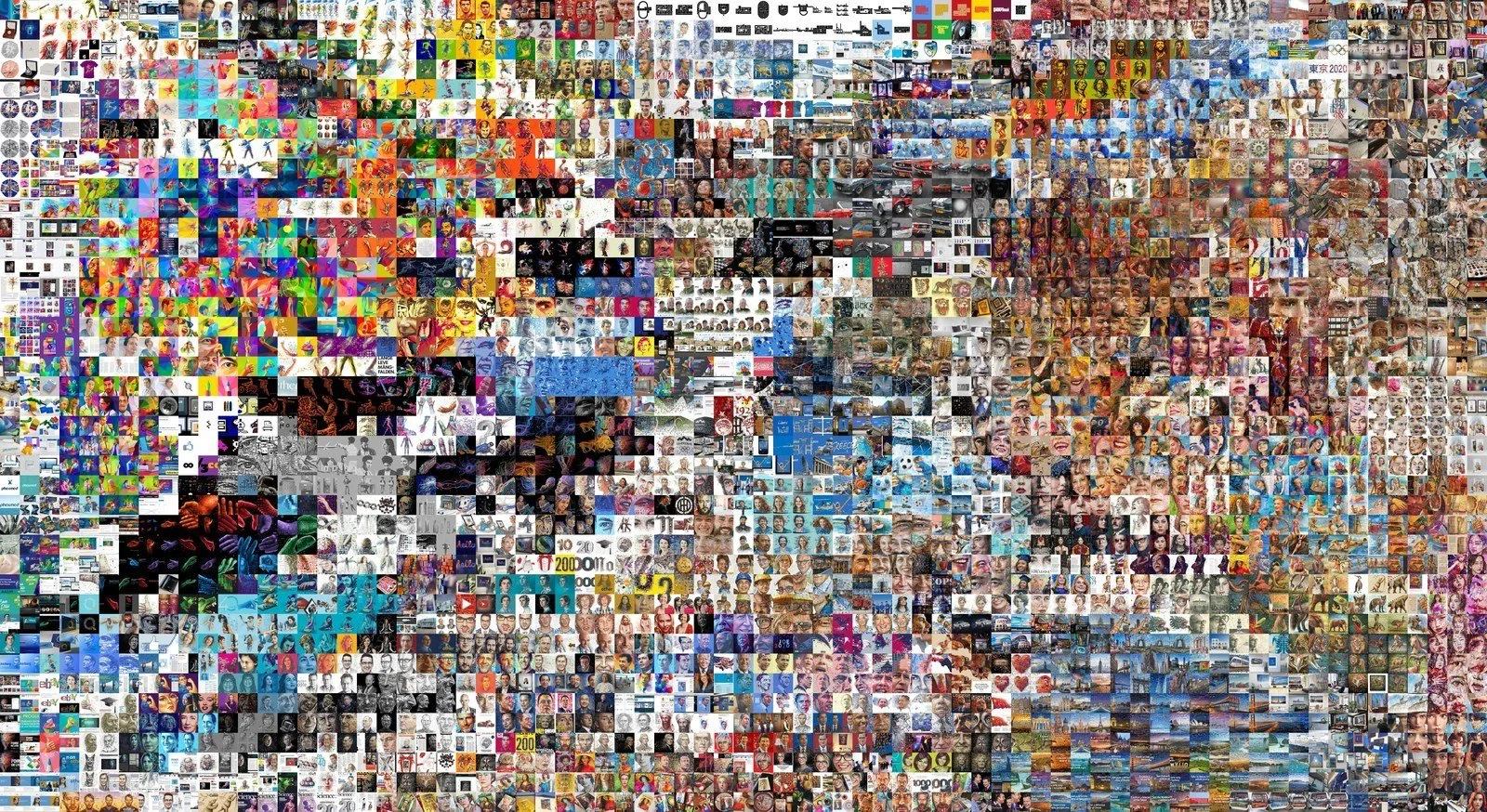
Animals gathered in one region, cities in another, then pin-ups on the beach, rooms with art on the wall, anime faces, burgers, hands on black. The Mona Lisa ended up next to Frida Kahlo. I did not tell the model either name.
Where it fails. “A cat” returned a tiger first, then a pattern of icons with no cat in it at all, then a lion and a leopard. My archive has few cats, and CLIP ranks by resemblance, so it fills the list with the nearest things it has. “An owl” found my two owls, then two eagles, for the same reason. And a search is only as good as the archive is large. My first idea was a photomosaic whose tiles are chosen by meaning: asked for birds, the model found 7 in its top 24, because my archive holds about fifteen bird pictures. A grid of everything was the honest use of the same tool.
CLIP ViT-B/32, on my computer: 3,518 images indexed in 194 seconds. The larger ViT-L/14, used for the grid: 261 seconds.
Further reading
- Radford et al., Learning Transferable Visual Models From Natural Language Supervision, ICML 2021. The CLIP paper. Code: openai/CLIP, MIT.
- Dosovitskiy et al., An Image is Worth 16x16 Words, ICLR 2021. The Vision Transformer, CLIP’s image side.
- For the grid: van der Maaten and Hinton, Visualizing Data using t-SNE, JMLR 2008, and SciPy’s linear_sum_assignment, which goes back to Kuhn’s Hungarian method (1955).
Describe a picture in words
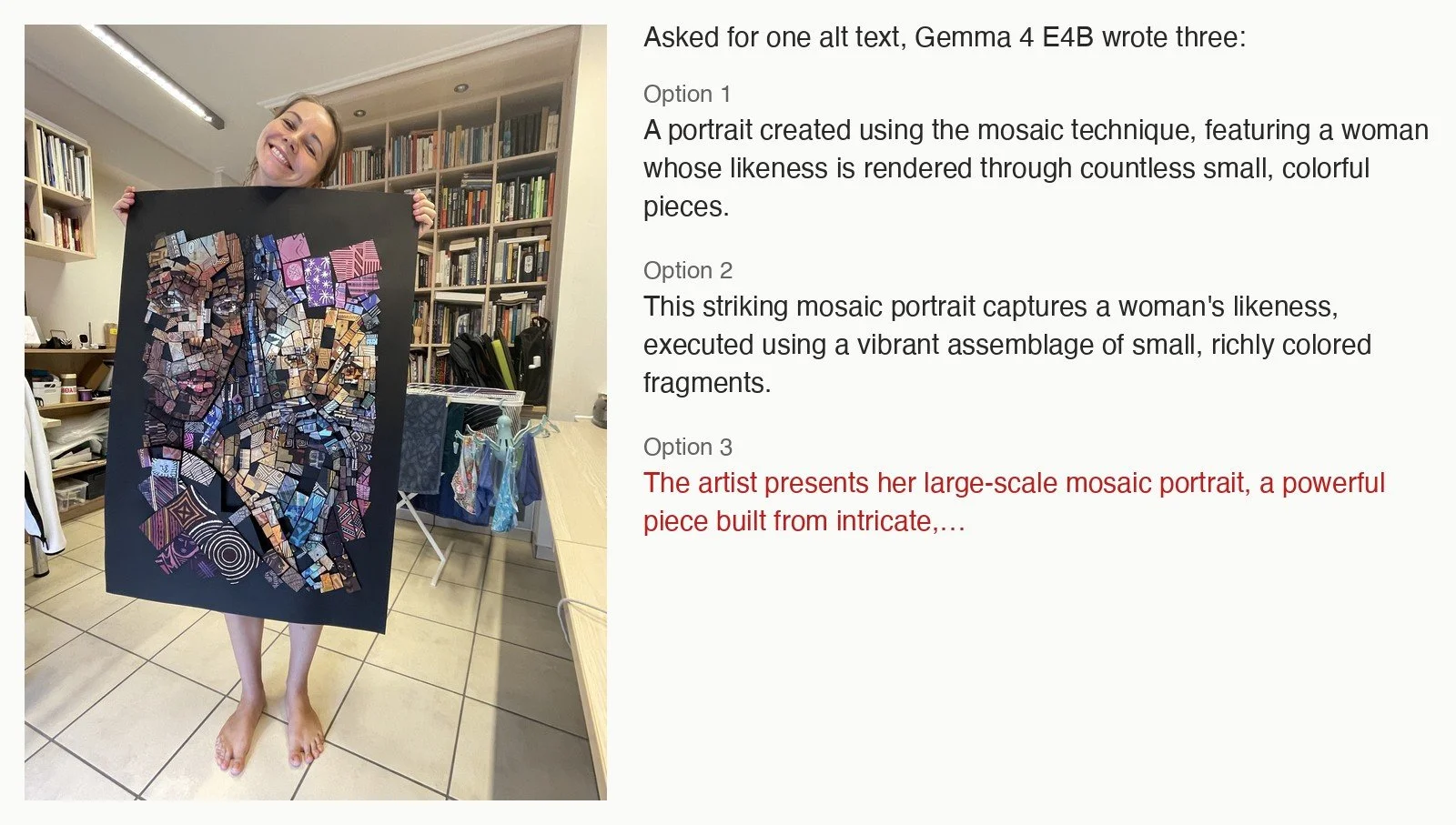
What it gives you. You give it a picture and a question, and it answers in sentences: a caption, an alt text, a list of what is in the frame.
How it works. A vision-language model is a language model with eyes attached. A small vision encoder turns the picture into a sequence of tokens, the same kind of units the language model reads as words, and the language model then writes its answer one token at a time. Gemma 4, Google DeepMind’s open family released in 2026, comes in sizes small enough for a desktop computer. I ran the E4B size in a 4-bit version: each weight stored in 4 bits instead of 16, which cuts memory roughly by four at a small cost in quality.
What you can do with it. Draft alt texts for a large archive, list what is in each picture, or ask a picture questions: what colour is the car, is there text, how many people.
Where it fails. On my mosaic portrait of Steve Jobs, made of retro computer icons, the same model described “a complex, vibrant digital collage” and did not see a face. On the photo above, of a woman holding up a collage portrait, it did see the face. But asked for one alt text, it wrote three, and the third begins “The artist presents her large-scale mosaic portrait”: it decided that the woman holding the work made it. Nothing in the photo says who made it. A model’s alt text is a draft that a person still has to read.
Gemma 4 E4B, 4-bit, on my computer: 18 seconds for this picture, loading included; about 6 GB of memory.
Further reading
- Gemma Team, Gemma 4 Technical Report, 2026, and the Gemma 4 model card. Apache-2.0.
- Blaizzy/mlx-vlm, which runs vision-language models on Apple’s MLX, and the 4-bit conversion I used.
Read the text in a picture
What it gives you. The letters in a picture, as text you can copy, search, translate or cut out.
How it works. Classic OCR, optical character recognition, works in two steps: find where the text is, then recognise each line. Tesseract began at Hewlett-Packard in the 1980s, was open-sourced in 2005 and developed further at Google, and since version 4 reads each line with a recurrent network, left to right. RapidOCR packages Baidu’s PaddleOCR models: one network marks the text regions, a second reads each region. Apple’s Vision framework has its own reader built into the operating system. A vision-language model has no separate reading step at all: you simply ask it to write down the text it sees.
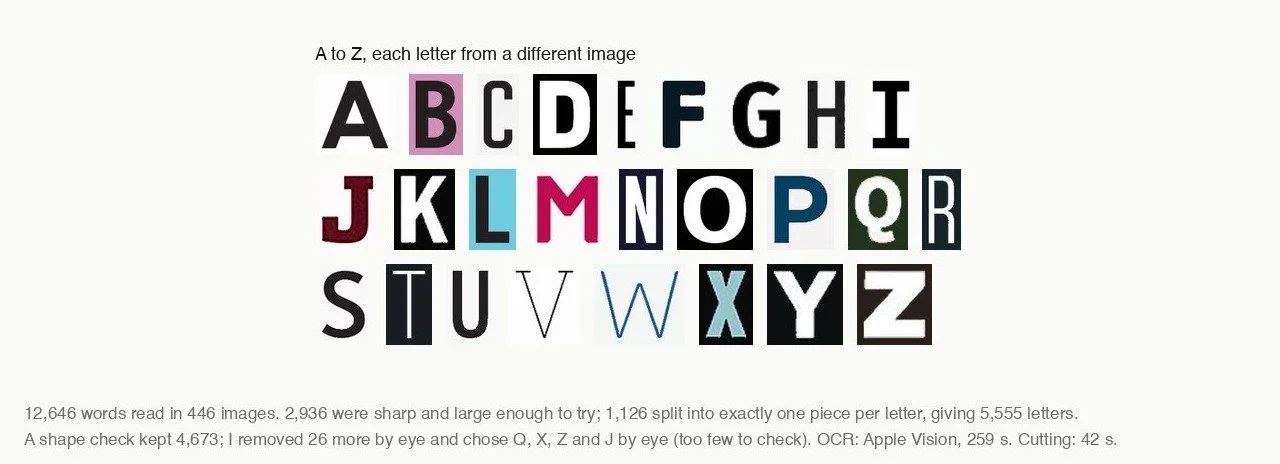
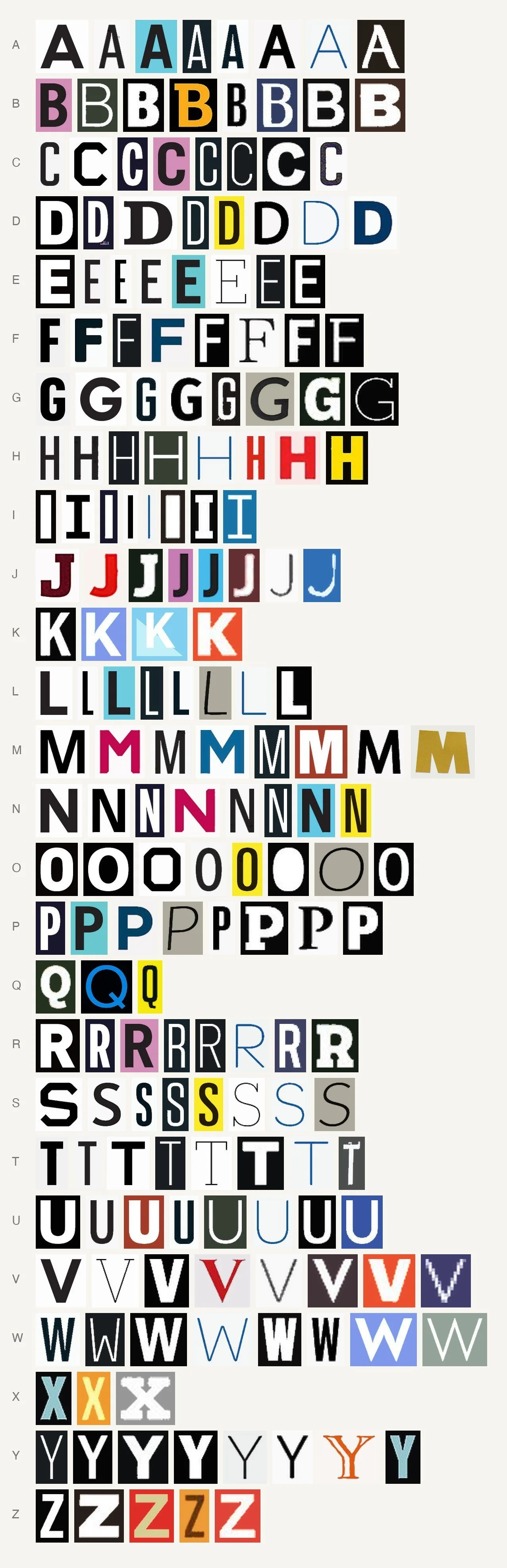
What you can do with it. Make covers, posters, signs and screenshots searchable by their words. Or, as I did, cut the letters out. Magazine covers, posters and signs are full of lettering. CLIP picked 446 images likely to hold lettering, Apple Vision read 12,646 words in them, with a box for each word, and classic image processing cut the words into letters. The result is an alphabet in which every letter comes from a different picture.
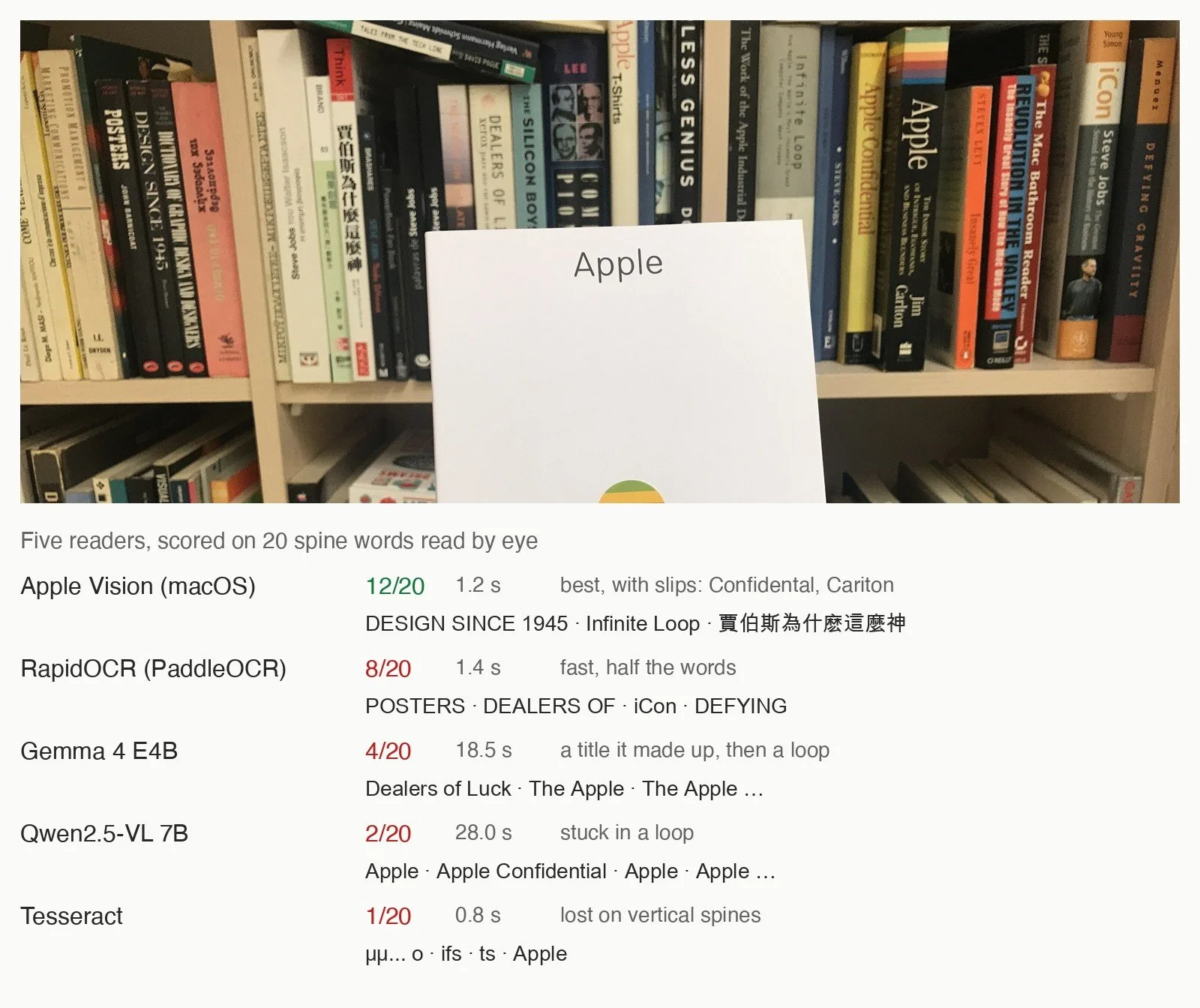
Where it fails. I tested five readers on a hard case: a shelf of book spines, most of them vertical, in English, Greek and Chinese, with 20 words I read by eye. Apple Vision read 12, and the Chinese title as well, with slips such as “Confidental” and “Cariton”. RapidOCR read 8, Gemma 4, Qwen2.5-VL 2 and Tesseract 1. The two language models did worse than plain OCR: Gemma wrote “Dealers of Luck” for Dealers of Lightning, a title it finished by guessing, and then both wrote “Apple” over and over until they hit their limit. Language matters too. On a close-up of Greek newspaper headlines, Apple Vision, which on my computer has no Greek in its list of languages, answered in Cyrillic, and only Gemma read half of the ten words. If your work is in another script, test on your own pages before you trust any reader.
On my computer, for the shelf: Tesseract 0.8 seconds, Apple Vision 1.2 (43 on its first call), RapidOCR 1.4, Gemma 19 and Qwen 28 seconds. Apple Vision read the 446 images for the alphabet in 259 seconds.
Further reading
- Smith, An Overview of the Tesseract OCR Engine, ICDAR 2007. Code: tesseract-ocr/tesseract, Apache-2.0.
- Du et al., PP-OCR: A Practical Ultra Lightweight OCR System, 2020. Code: PaddleOCR, RapidOCR.
- Apple: VNRecognizeTextRequest, callable from Python with PyObjC.
- Bai et al., Qwen2.5-VL Technical Report, 2025. The 7B model is Apache-2.0; the 3B is for research only.
Find and count things
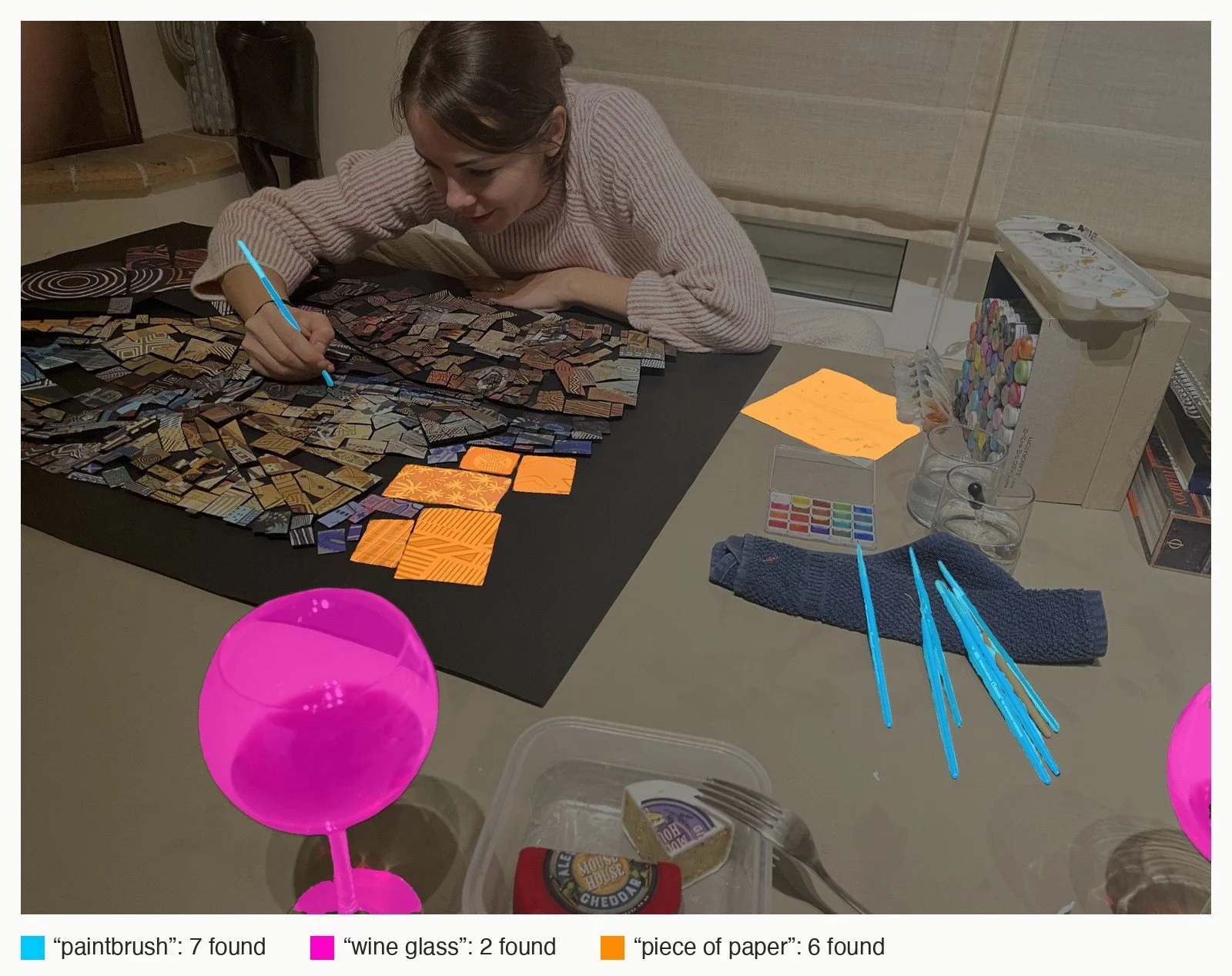
What it gives you. The outline, pixel by pixel, of every thing of one kind in a picture. You type “paintbrush”, and every paintbrush it can find is outlined, so you can count them, colour them or cut them out.
How it works. Meta’s Segment Anything (SAM, 2023) splits the work in two. A large image encoder looks at the picture once; then a small, fast decoder answers prompts, a click or a box, with a mask. It was trained on more than a billion masks over 11 million images, which is why it outlines things it was never told the names of. Its automatic mode scatters a grid of points over the picture and keeps the good masks. SAM 3 (2025) adds concepts: given a short phrase, it finds and outlines every instance, after deciding whether the concept is present at all.
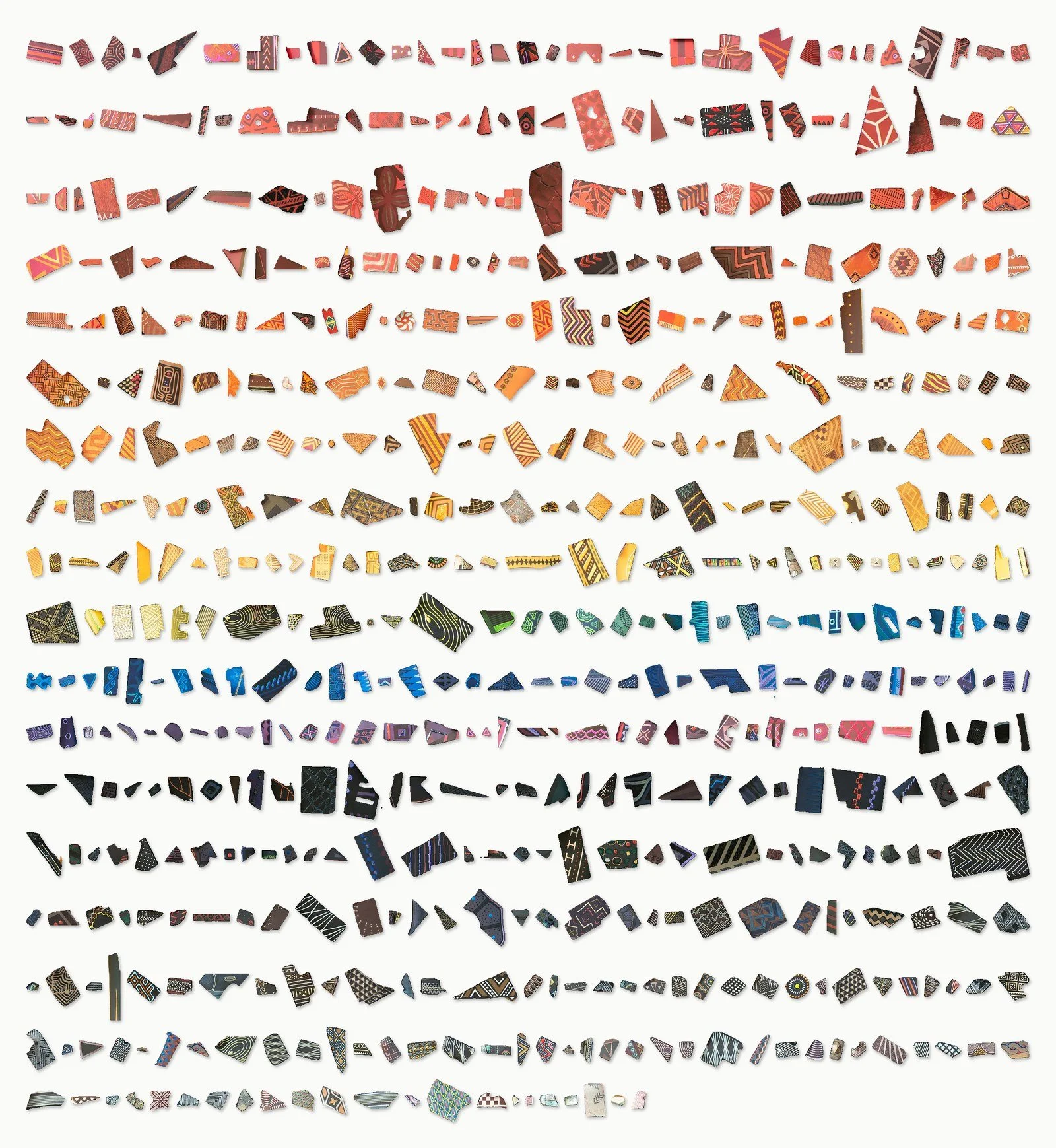
What you can do with it. Count objects, isolate each one, recolour a single kind of thing, or take a picture apart into its pieces. I took apart “And Fire”, a portrait from my series The African Bricks, made of hand-cut patterned paper on board. The original SAM found 581 pieces, covering 69% of the picture, and I sorted them round the colour wheel.
Where it fails. On the work table above, “paintbrush” found 7 and “wine glass” 2. “Piece of paper” found 6: the note and the five largest pieces. The hundreds of small cut pieces on the board it left alone. A text prompt finds clear examples of a word, not everything: on “And Fire”, “paper piece” found 19 pieces and “tile” none, where the older SAM, seeding points everywhere, found 581. Count with a model, then check a sample by eye.
SAM 3.1, on my computer: one to two seconds per search once the model is loaded. The original SAM: 216 seconds to find 984 masks, 581 pieces once overlaps were resolved.
Further reading
- Kirillov et al., Segment Anything, ICCV 2023. Code: segment-anything, Apache-2.0.
- Ravi et al., SAM 2: Segment Anything in Images and Videos, 2024.
- Carion et al., SAM 3: Segment Anything with Concepts, 2025. Code: facebookresearch/sam3. Under Meta’s own SAM License; the weights are gated.
Separate the figure from the ground
Cutting a figure out of its background used to mean a steady hand and a long time with a pen tool. Two kinds of model do it now: one keeps what you want, the other removes what you do not.
Cut a figure out
What it gives you. A mask that separates the subject from the background, so the subject can be placed anywhere.
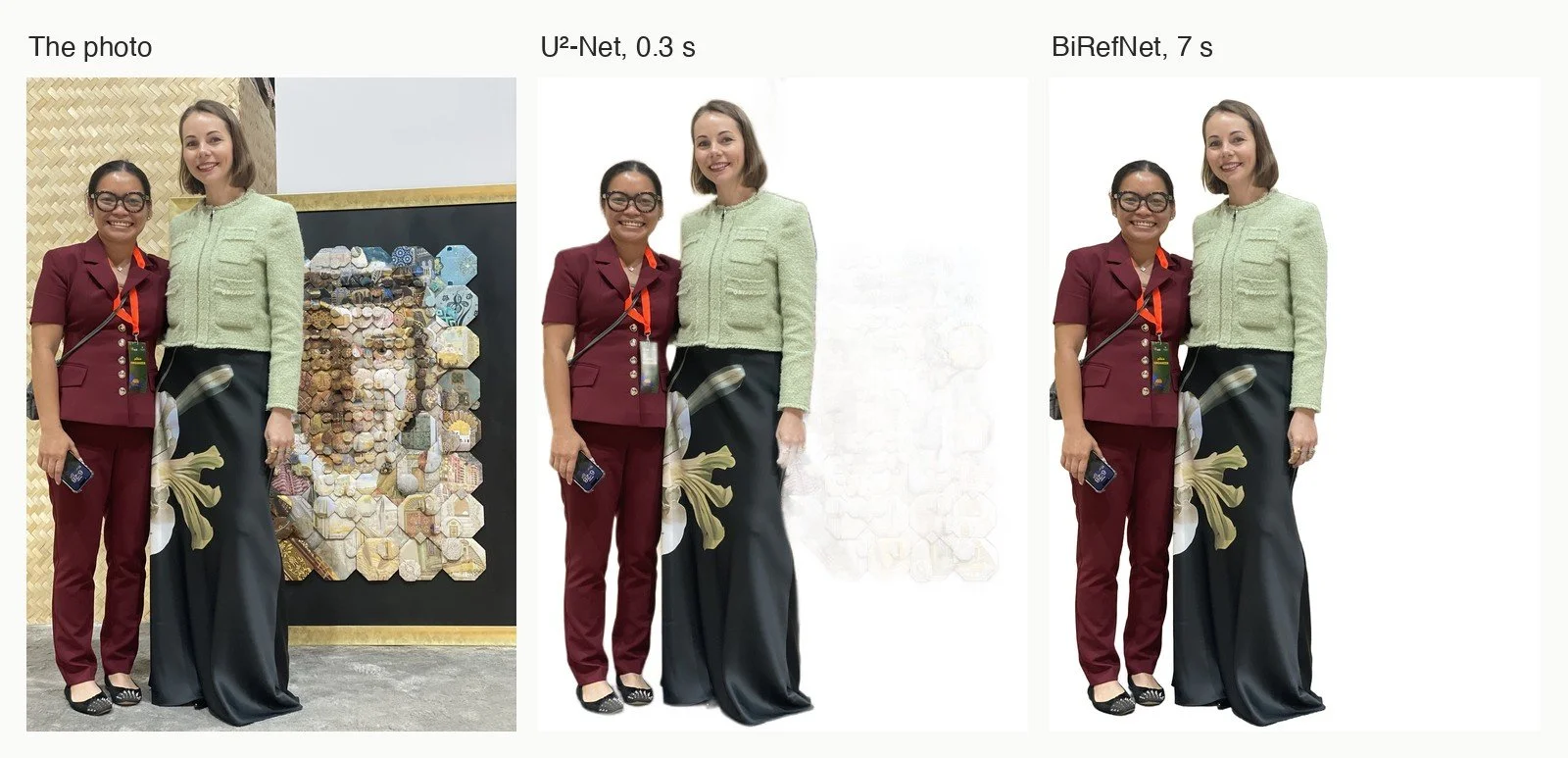
How it works. Both models in the picture answer one question per pixel: subject or not. U²-Net (2020) is a U-shaped network made of smaller U-shaped blocks, which lets it see the whole figure and fine detail at once; it works on a small, 320-pixel copy of the picture. BiRefNet (2024) was built for high-resolution cut-outs of things with fine structure, hair, wire, lace. It works at 1024 pixels and looks back at patches of the original image to recover detail.
What you can do with it. Cut-outs for layouts and collages, masks for compositing, a clean figure to turn into 3D (as in the section on photo to 3D), or the figure in the first picture of this article.
Where it fails. On a photo of two women in front of a mosaic, U²-Net kept a pale ghost of the mosaic behind them. BiRefNet left the mosaic out and kept clean edges on the hair, the lanyard and the long skirt, at the cost of time and a graphics processor. For a quick mask, the small one; for print, the large one. And a cut-out cannot know what you wanted: in the first picture of this article, it kept the woman and the portrait she is hanging as one figure.
On my computer: U²-Net under half a second, BiRefNet about 7 seconds.
Further reading
- Zheng et al., Bilateral Reference for High-Resolution Dichotomous Image Segmentation (BiRefNet), 2024. Code: ZhengPeng7/BiRefNet, MIT.
- Qin et al., U²-Net: Going Deeper with Nested U-Structure for Salient Object Detection, Pattern Recognition 2020. Apache-2.0.
- rembg, a command-line tool that packages these models. BRIA’s RMBG-2.0, often recommended for the same job, is non-commercial without an agreement.
Remove what you do not want
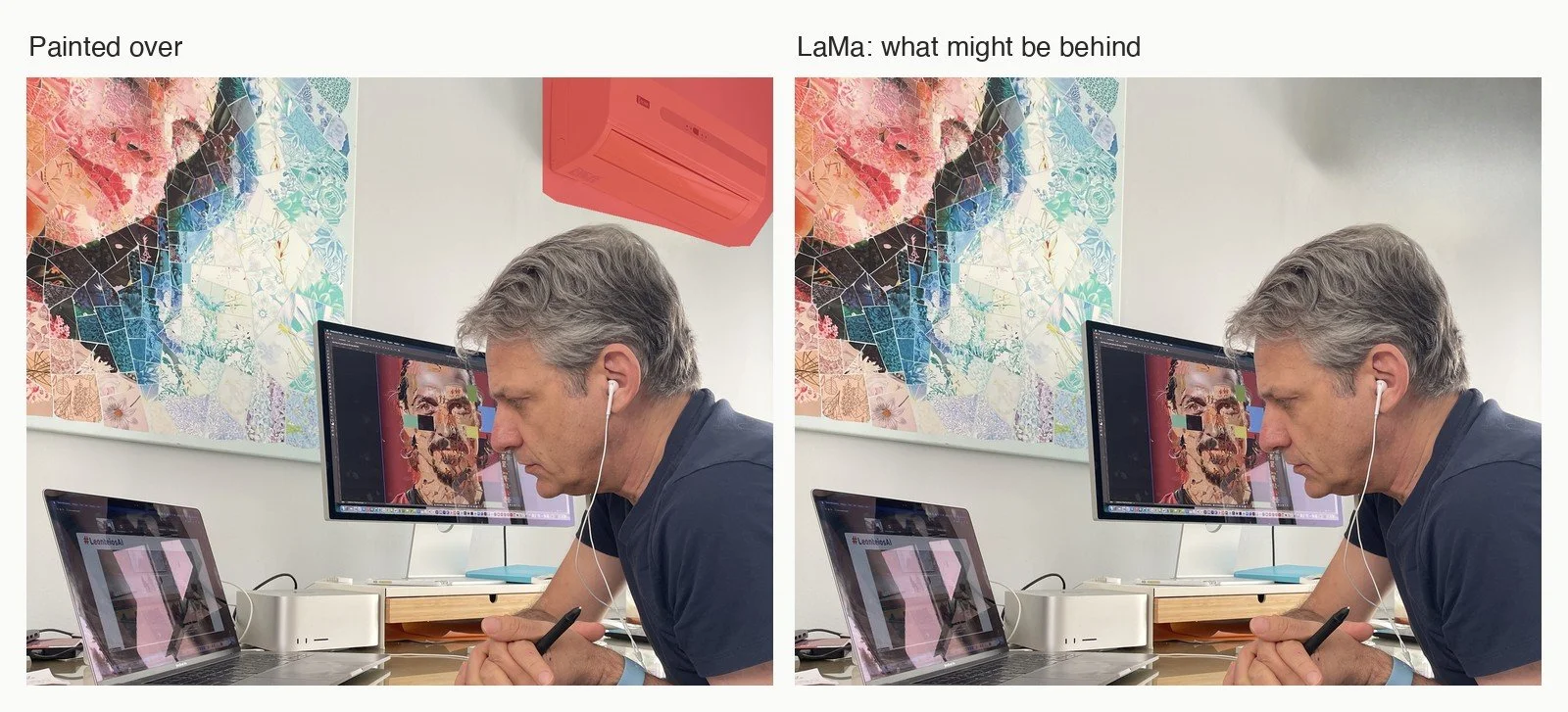
What it gives you. You paint over something, a pole, a wire, a passer-by, and the hole fills with what could plausibly be behind it.
How it works. The difficulty of filling a large hole is that the right texture may be far away in the picture. LaMa (2022) uses Fourier convolutions: part of each layer works on the frequencies of the whole image, so even early layers see from one edge to the other, and repeating patterns such as brick, grass or fabric continue across the hole.
What you can do with it. Clean a photograph before you use it as a source, remove a distraction from a reference picture, extend a background.
Where it fails. In the photo above, the air conditioner is gone and the wall looks whole, with a faint grey shadow where the unit was. But that wall is invented: a plausible wall, not the one that was behind it. On a document or a news photograph, that matters.
LaMa, on my computer's processor: under 5 seconds.
Further reading
- Suvorov et al., Resolution-robust Large Mask Inpainting with Fourier Convolutions, WACV 2022. Code: advimman/lama, Apache-2.0; an ONNX export.
Enlarge and repair, but do not trust it
These are among the best-known tools, and the ones I trust least. They do not recover what was lost. They invent something plausible in its place.
Enlarge a small image
What it gives you. A small image enlarged four times, looking sharp rather than soft.
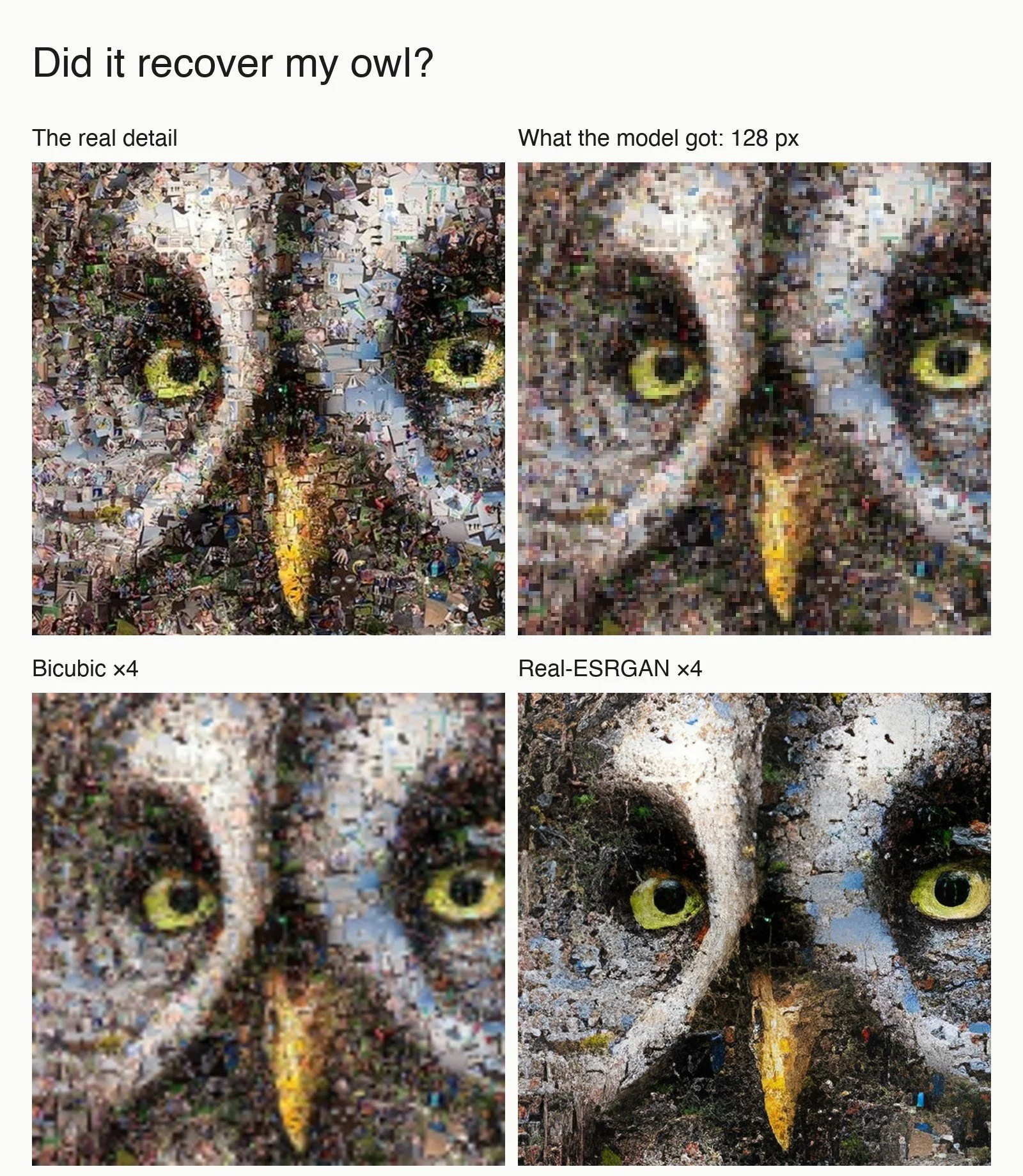
How it works. Real-ESRGAN (2021) was trained on pairs: a clean image and a copy damaged on purpose, by blurring, shrinking, noise and JPEG compression, to imitate what happens to pictures on the internet. It learns to go back from damaged to clean. A second network judges whether the result looks real, which pushes the first to produce crisp texture rather than a safe blur. That is the source of both its strength and its problem.
What you can do with it. Rescue a small reference picture, enlarge a screen grab for a sketch, prepare an old web image for a draft print.
Where it fails. On a crop of my owl, a photo mosaic, the eyes and the beak came out sharp. The tiny photographs that make up the owl did not: the model replaced them with a texture like peeling paint. Upscaling does not recover detail. It makes up plausible detail, and when the detail is the work, the work is gone.
Real-ESRGAN, on my computer: under half a second for this crop.
Further reading
- Wang et al., Real-ESRGAN: Training Real-World Blind Super-Resolution with Pure Synthetic Data, ICCV Workshops 2021. Code: xinntao/Real-ESRGAN, BSD-3-Clause.
- Upscayl, a desktop app that runs models of this kind with no code.
Restore a face
What it gives you. A sharp face from a small, blurred or compressed one.
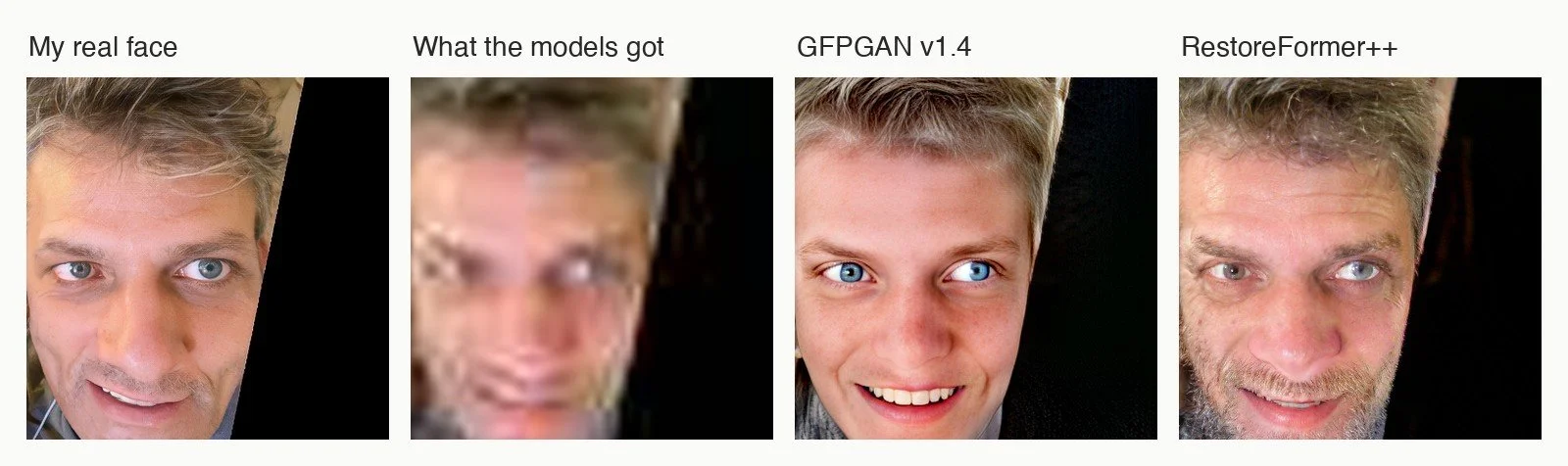
How it works. These models know what faces look like and use that knowledge to fill in what the damaged picture does not say. GFPGAN (2021) borrows the knowledge from a face generator already trained on many faces, and steers it with the damaged input. RestoreFormer++ (2023) keeps a learnt dictionary of high-quality face parts and looks up the parts that best match each region of the damaged face.
What you can do with it. Very little, honestly, where the likeness matters. It can make a tiny face in a crowd readable as a face, or a damaged family photo pleasant to look at, as long as nobody takes the result for a record.
Where it fails. I shrank a photograph of myself to 64 pixels and compressed it. GFPGAN gave me back a much younger man with fair hair and bright blue eyes. RestoreFormer++ kept the grey hair and added a heavier beard than mine. The face is sharp; it is not the same face.
On my computer: about one second for each model. To find and align the face I used InsightFace's detector, whose pretrained models are for non-commercial research only: fine for a test, not for paid work. CodeFormer, the best known of these models, is non-commercial too, so I did not test it.
Further reading
- Wang et al., Towards Real-World Blind Face Restoration with Generative Facial Prior (GFPGAN), CVPR 2021. Code: TencentARC/GFPGAN.
- Wang et al., RestoreFormer++, IEEE TPAMI 2023. Code: wzhouxiff/RestoreFormerPlusPlus.
- Zhou et al., Towards Robust Blind Face Restoration with Codebook Lookup Transformer (CodeFormer), NeurIPS 2022; its licence.
Turn a picture into lines
Draw it like an illustrator
What it gives you. A line drawing of a photograph.
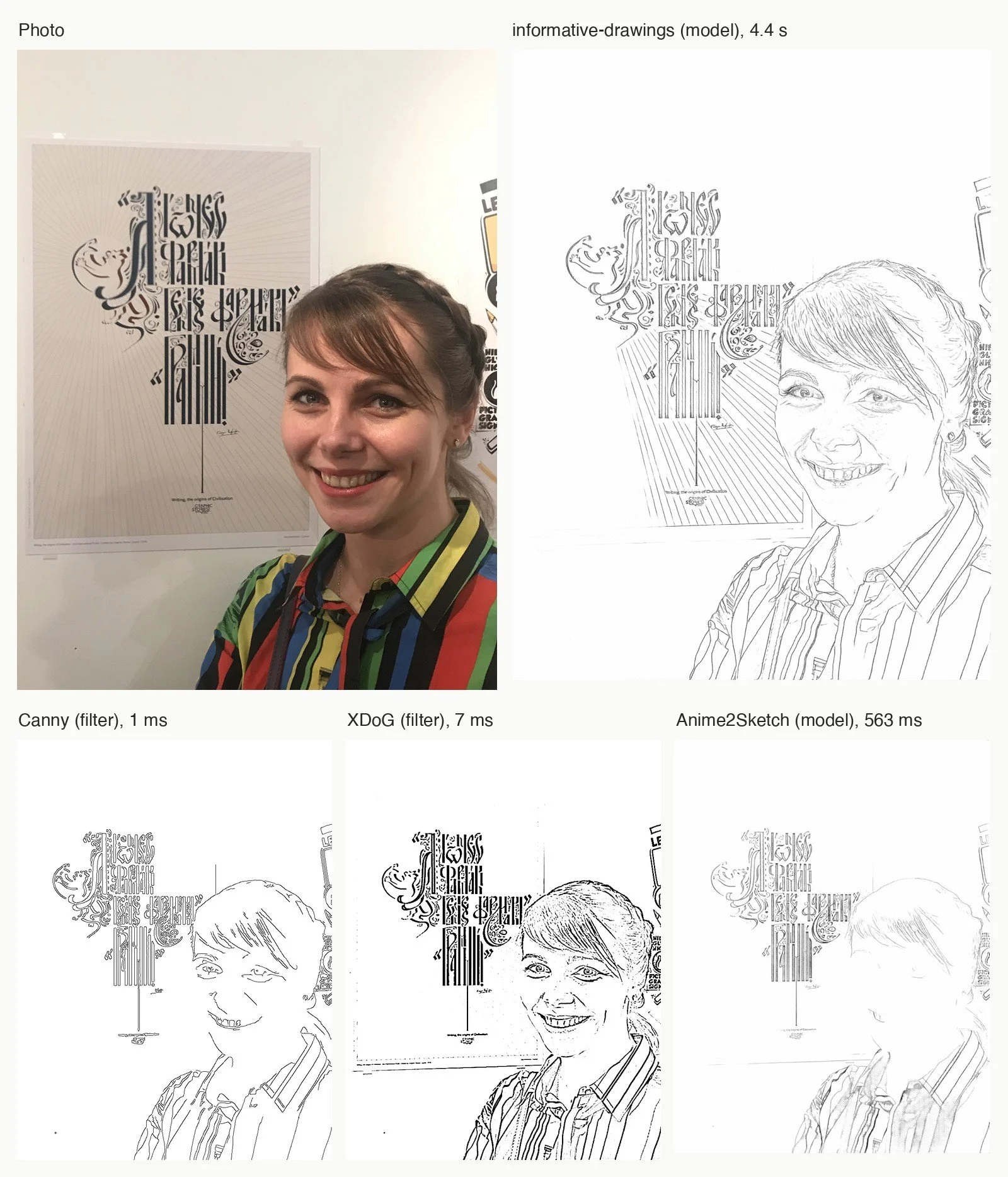
How it works. The old way, shown in Before learning, is to find edges. Canny finds thin, clean edges; XDoG subtracts two blurred copies of the image and thresholds the difference softly, which gives lines with weight, closer to ink. Both draw every edge, shadows and texture included, and miss contours that have no contrast. A learnt line-drawing model decides what an illustrator would draw. “Informative drawings” (2022) was trained with two extra tests: from the drawing alone, another network must recover the depth of the scene, and CLIP must recognise the same content in the drawing as in the photo.
What you can do with it. Make a drawing to start from, a guide for painting or for a mosaic, or a file for a pen plotter. I took a photo from Bahrain through the model and then through plain geometry: the centre of each line rather than its two edges, short strokes dropped, the order chosen so the pen travels as little as possible in the air.
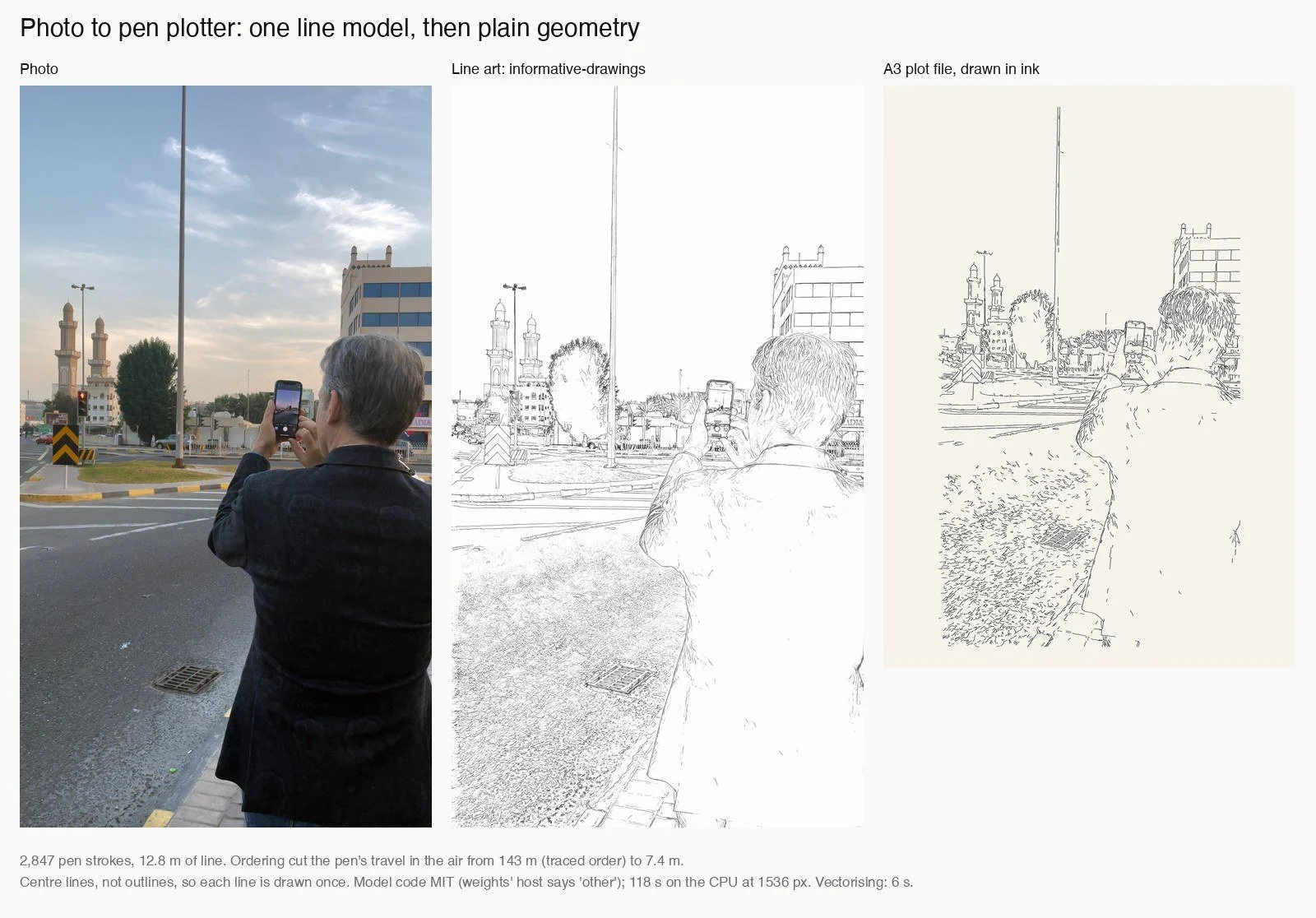
Where it fails. On the photo of a woman in front of a calligraphic poster, the learnt model looks most like a hand drawing and keeps the face, the smile and the poster’s letters. XDoG keeps the face too but goes dark and grainy in the hair and the striped shirt. Canny is clean but thin and broken. Anime2Sketch, trained on illustrations, nearly loses the face. In the plotter work, the model was the smallest part: the geometry after it decided how the drawing would actually be drawn.
On my computer's processor: Canny 1 millisecond, XDoG 7, informative drawings 4.4 seconds. The A3 plot has 2,847 strokes; ordering them cut the pen's travel in the air from 143 metres to 7.
Further reading
- Chan, Durand and Isola, Learning to generate line drawings that convey geometry and semantics, CVPR 2022. Code: carolineec/informative-drawings, MIT.
- Winnemöller, Kyprianidis and Olsen, XDoG: An eXtended difference-of-Gaussians compendium including advanced image stylization, Computers & Graphics 2012.
- Anime2Sketch, and controlnet_aux, which packages both models.
- Douglas and Peucker, Algorithms for the reduction of the number of points required to represent a digitized line or its caricature, 1973. The simplification used for the plotter.
From pixels to curves
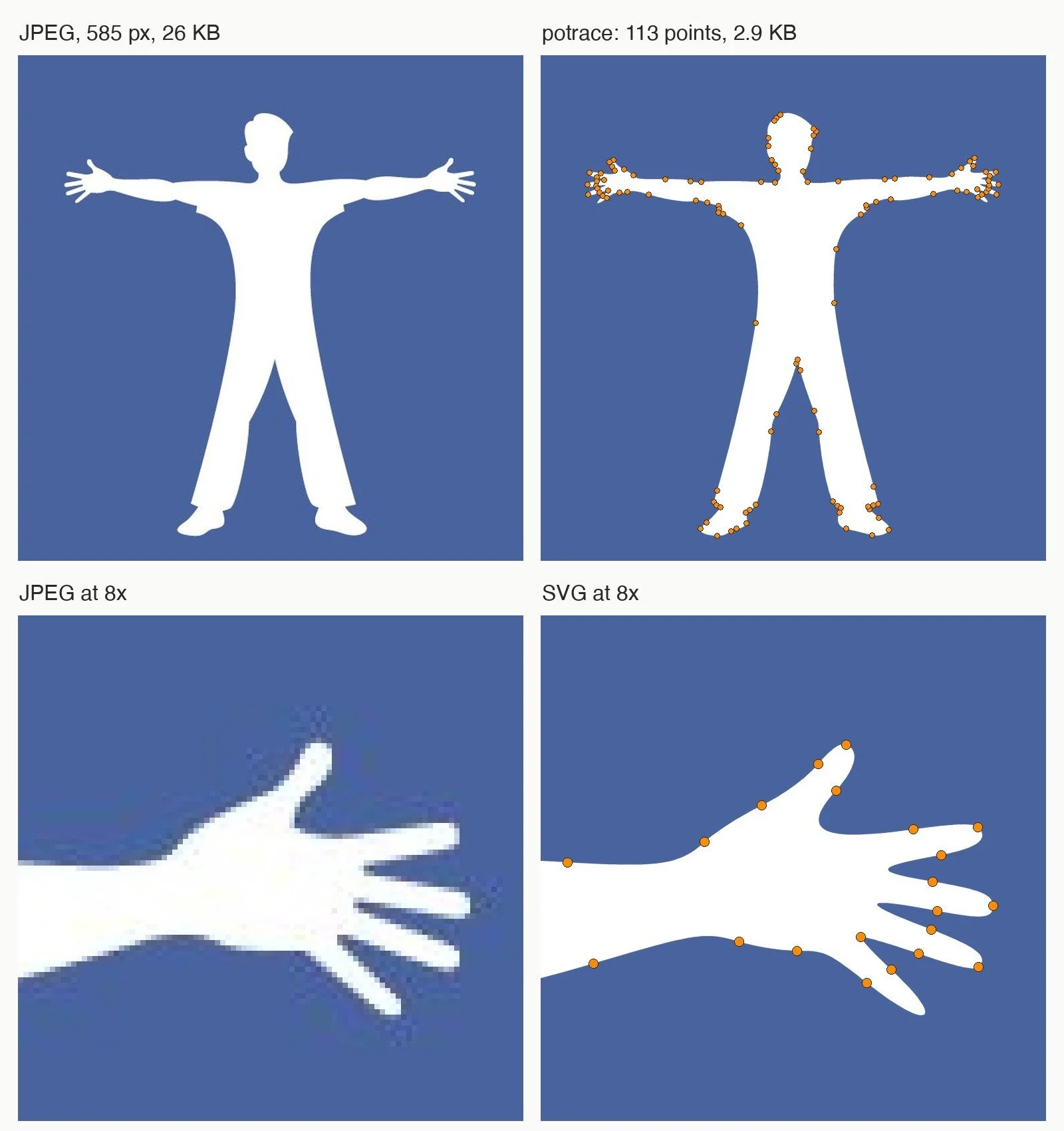
What it gives you. Smooth curves from a black-and-white bitmap, which scale to any size: a logo from a JPEG, a drawing for a cutter or a plotter.
How it works. No model at all. Peter Selinger’s Potrace follows the boundaries between black and white, finds a polygon with as few corners as possible that stays close to each boundary, then replaces it with Bézier curves. The orange dots in the picture are the points it chose.
What you can do with it. Recover a logo that only exists as a small JPEG, prepare a drawing for cutting, turn a stencil into a vector file.
Where it fails. It only knows black and white: a colour logo needs one pass per colour, and a soft photograph gives a blotchy trace. And it traces the two edges of a line, not its centre, which is why the plotter work above needed a different method.
Potrace, on my computer: 9 milliseconds for my studio logo; the SVG is 2,879 bytes.
Further reading
- Selinger, Potrace: a polygon-based tracing algorithm, 2003, and the project page. GPL: the output is yours to use; the licence matters if you build Potrace into software you distribute.
The old methods, still in daily use
Measure, straighten, count colours
What it gives you. The jobs that need no model at all: straighten a photo taken at an angle, separate a dark object from a light wall, find the main colours of a picture.
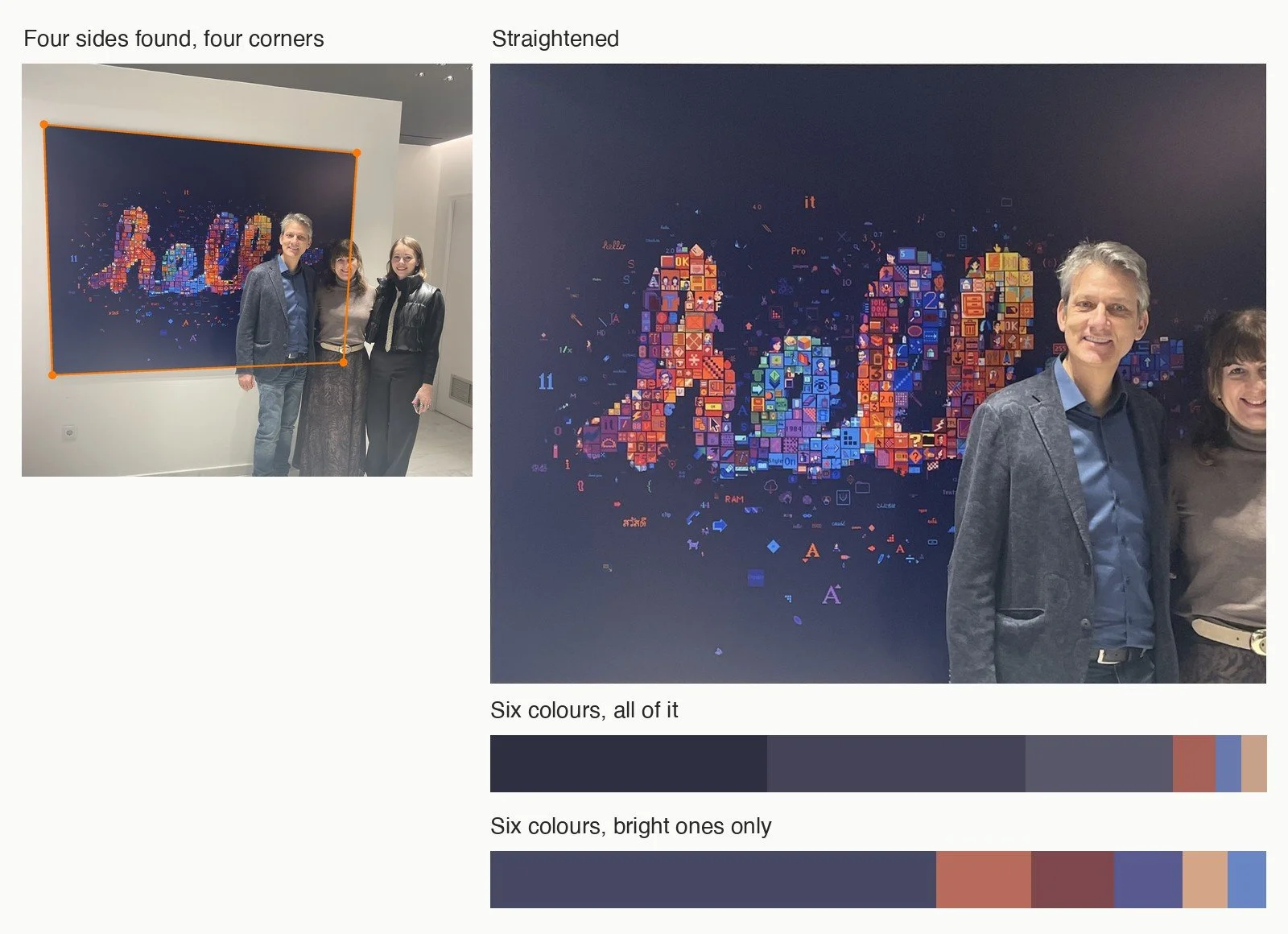
How it works. OpenCV, started at Intel in 1999, is a large library of the methods described in Before learning and many more. In the picture, four of them run in a chain: separate the dark canvas from the white wall by brightness, keep the largest dark shape, fit a straight line to each of its four sides with RANSAC, a method that ignores the points that do not agree, and take the corners where the lines meet; then warp the picture so those corners become a rectangle. For the palette, k-means: it places six colour centres among the pixels and moves each to the average of the pixels nearest to it, until they stop moving.
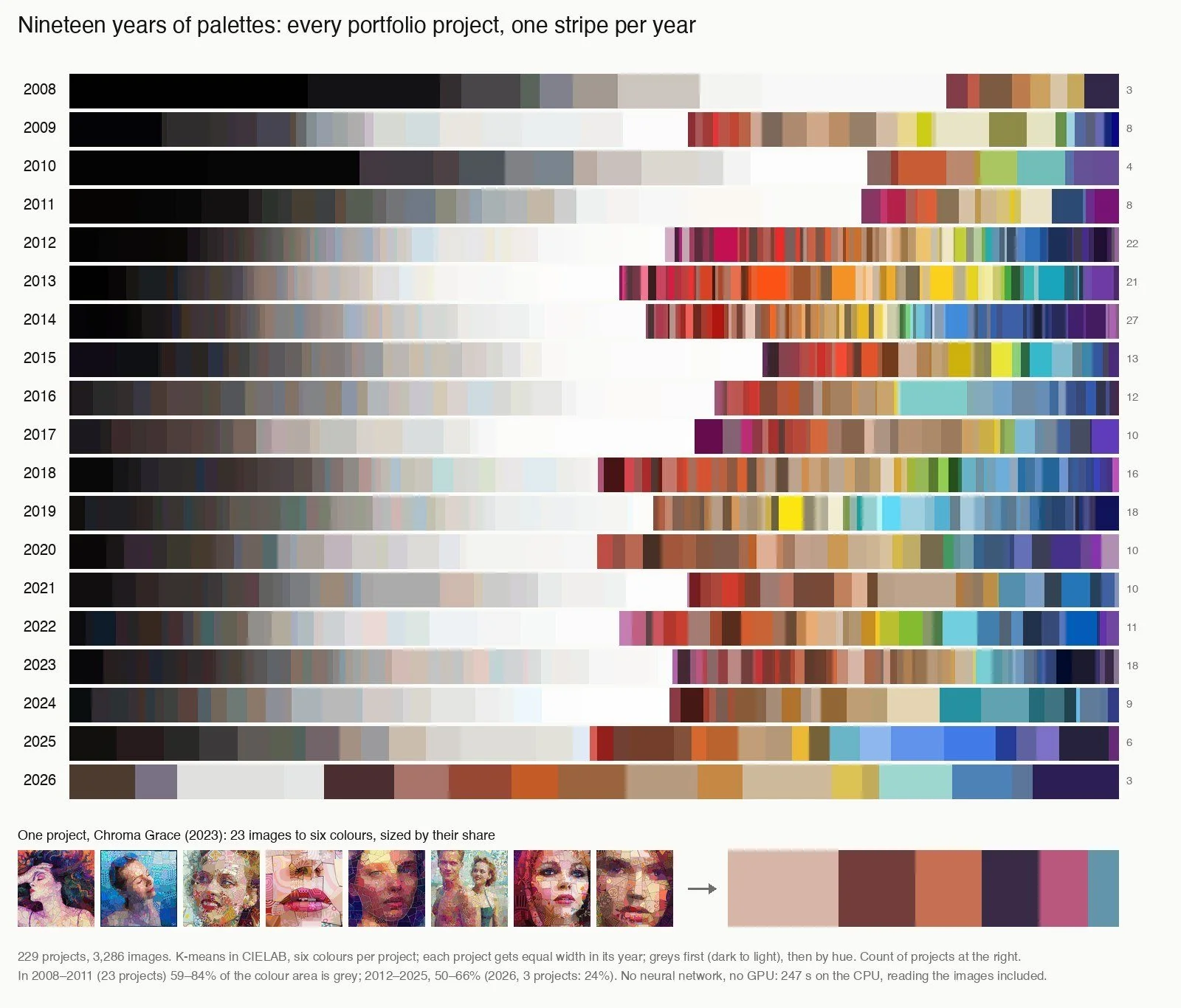
What you can do with it. Straighten and crop photographs of artworks, extract palettes, measure areas, threshold, count. Or look at a body of work from a distance. I reduced every project in my portfolio to six colours and laid them out one stripe per year, nineteen years in all.
Where it fails. Each step has a number someone has to choose, and the chain works because the canvas is dark and the wall white. Here three people stand in front of the canvas, and their dark clothes join it into one shape. I had to tell it which part of each side is visible; the corner hidden behind them comes from extending the sides. The method has no idea what a person is, so the straightened canvas still has two of them in it, and both palettes carry their clothes and skin. A model that knows people would have to cut them out first. But when it fits, it takes milliseconds, it gives the same answer every time, and you can explain every step. The second palette leaves out the dark ground and keeps only the bright colours.
On my computer's processor: straightening 0.2 seconds, a palette under 0.1 seconds; 229 projects and 3,286 images in 247 seconds.
Further reading
- Code: opencv/opencv, Apache-2.0, and how to cite it.
- Lloyd, Least squares quantization in PCM, 1982, written at Bell Labs in 1957: the k-means algorithm.
- Otsu, A threshold selection method from gray-level histograms, 1979. Choosing a threshold automatically.
- CIELAB, the colour space where distances match what the eye sees.
Running it yourself
Why on your own computer
Everything in this article ran on one computer, offline. There are good reasons for that. Client work, unpublished pieces and photographs of people stay at home instead of going to someone else’s server. Once a model is on the disk, the ten-thousandth image costs the same as the first, which is what makes it possible to sort a whole archive rather than a sample. And a downloaded model is a file with a version and a licence: it gives the same answer tomorrow, where a hosted service can change under you.
It is not free of effort. Each model has its own setup, and some of the best-known ones are built only for one kind of graphics card. There are three ways in. Apps such as LM Studio and Ollama run vision-language models behind a chat window, and Upscayl runs upscalers. Node graphs such as ComfyUI and chaiNNer let you connect models by dragging boxes. And a few lines of Python run almost anything else, which is how everything here was done.
My computer is an Apple Mac with 128 GB of memory shared by the processor and the graphics processor. The models here used far less: Gemma, for one, peaked at about 6 GB.
Read the licence
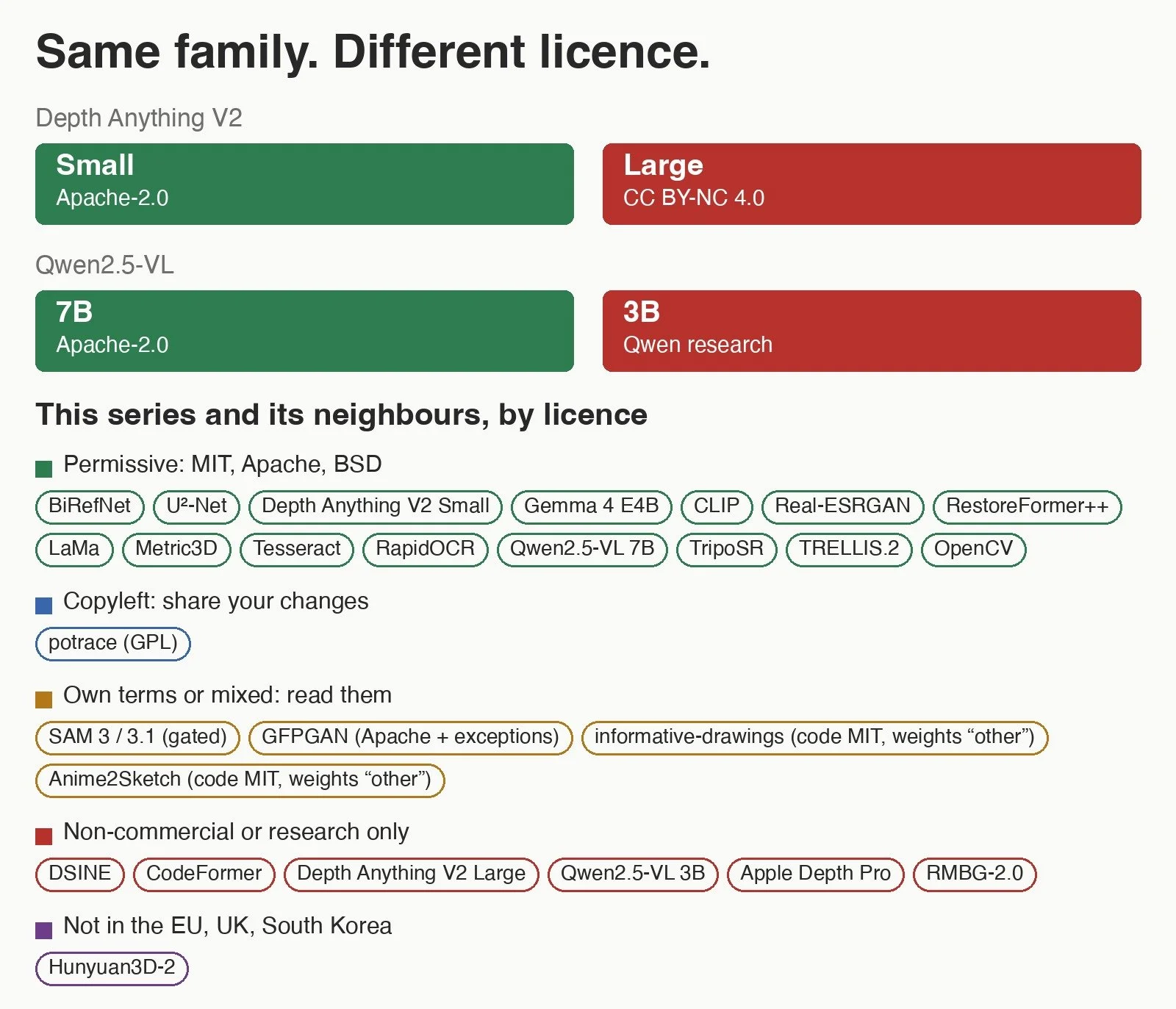
The licence of the code is often not the licence of the weights you download, and models of the same family can carry different terms. Depth Anything V2 Small is Apache-2.0, Large is non-commercial. Qwen2.5-VL 7B is Apache-2.0, 3B is for research only. CodeFormer, DSINE, Apple’s Depth Pro and RMBG-2.0 are non-commercial or for research only, and Hunyuan3D-2, for 3D, excludes the European Union, the United Kingdom and South Korea. I checked every one on 3 November 2026:
| Task | What I ran | Licence |
|---|---|---|
| Search by meaning | CLIP ViT-B/32, ViT-L/14 | code MIT; the weights’ card has no tag |
| Describe a picture | Gemma 4 E4B | Apache-2.0 |
| Read text | Tesseract; RapidOCR; Gemma 4; Qwen2.5-VL 7B; Apple Vision | Apache-2.0 (Vision: part of macOS) |
| Find and count | SAM 3.1; the original SAM | SAM License, gated; Apache-2.0 |
| Depth | Depth Anything V2 Small | Apache-2.0 (Large: CC BY-NC 4.0) |
| Normals | Metric3D v2 | BSD-2-Clause |
| Photo to 3D | TripoSR | MIT |
| Cut-outs | BiRefNet; U²-Net | MIT; Apache-2.0 |
| Remove objects | LaMa | Apache-2.0 |
| Enlarge | Real-ESRGAN | BSD-3-Clause |
| Restore a face | GFPGAN; RestoreFormer++ | Apache-2.0 with exceptions; Apache-2.0 |
| Line art | informative drawings; Anime2Sketch | code MIT; the weights’ host says “other” |
| Pixels to curves | Potrace | GPL |
| Classic methods | OpenCV | Apache-2.0 |
I am a designer, not a lawyer: this is what the licences say on their face, not legal advice. When a job is paid, read the licence file itself, not the badge.
Further reading
- The licence pages behind the list: Depth Anything V2 Large, Qwen2.5-VL 3B, CodeFormer, DSINE, Depth Pro, RMBG-2.0, Hunyuan3D-2, InsightFace.
- Apps: LM Studio, Ollama, Upscayl, ComfyUI, chaiNNer.
What machines see, and what they miss
Each model in this article answers one question about a picture: what is in it, how far, which way it faces, which pixels belong together, how to draw it. Knowing which question a model answers tells you when to use it and why it fails. Seven lessons came back again and again:
- Restoration invents. Upscaling and face restoration do not recover detail; they make up plausible detail. On a portrait that can mean a different face.
- A description is a draft. A model missed the face in one mosaic portrait, and on another decided who had made the work.
- Depth has no features inside a face. Shape models see objects, not expressions.
- A text prompt finds named things, not everything. “Paper piece” found 19 pieces where seeding points everywhere found 581.
- Language matters. Most readers failed on Greek and on vertical spines; test on your own pictures.
- A model that measures shape is not a renderer. The photograph already holds the light of its moment.
- The licence of the weights is not the licence of the code.
Machines see much as we do, and they see things we cannot. But each of them sees one thing at a time. Deciding what to look at, and what the picture is for, is still the work of the person looking.